
How to fix Huion Pen68 Dropped-drawing while hovering

thlong123 and 3 other contributors
Last updated on Sep 28, 2026
Views: 19K
View statistics:
- Past 24 Hours:
- 3
- Past 7 Days:
- 16
- Past 30 Days:
- 112
- All Time:
- 18,969
Comments: 19
2 comments on steps, 17 guide comments.
Go to guide commentsCompleted: 8 9
8 people have marked this guide "completed." Will you be next?
9 people have marked this guide "completed." Including you — great job!
Favorites: 1 2
1 person has favorited (and subscribed to) this guide. Will you be next?
2 people have favorited (and subscribed to) this guide — including you!
Community-Contributed Guide
An awesome member of our community made this guide. It was not created by iFixit staff.
Introduction
Go to step 1 ↓If you drop your huion pen and it starts drawing on its own while hovering, it could mean the inner was pushed in and the pen constantly on. This guide will help you adjust the inner as it supposed to be.
The Pen68 is the digital pen that comes with some of Huion's graphics tablets, including the Huion 420.
What you need
Tools

-
-
-
Remove the buttons first. (use a flat screw driver or something similar) (pic 1)
-
Push the silver tab & black tab down and push upwards to remove the mainboard
-
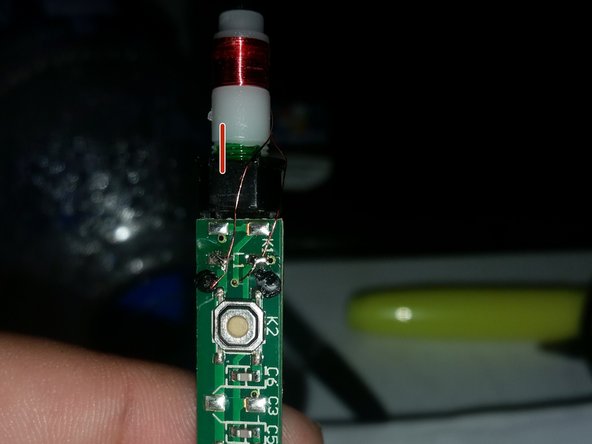
twist the white cylinder to adjust the height offset of the nub
 Ask FixBot
-
-
-
Use a soldering iron to remove the wire (remember which one goes where.) (pic 1)
-
Mark the white plastic and the black one (so you know when to stop when screw it back) (pic 2)
-
Unscrew the white part. Just one or two turns to bring it back to the original position. If you would like to see what's inside, remember which way the spring goes when unscrew the whole thing. It's revrsed in this pic (pic 3)
-
-
-
-
Put everything back together. Stop the white plastic at the mark. Put the tip on to see if the spring works (the tip moves freely; turn the white plastic back or forth to get a design pressure sensitivity).
-
Remember to pull the metal up or else the pen won't have power. (pic 2)
-
-




To reassemble your device, follow these instructions in reverse order.
Cancel: I did not complete this guide.
8 other people completed this guide.

17 Guide Comments
I suspect this happened to mine but i dont have a soldering iron
