Free Shipping on Domestic Orders $75+

How to Wire a RJ-45 KeyStone Jack

What you need

    1. How to Wire a RJ-45 KeyStone Jack, How to Wire a RJ-45 KeyStone Jack: step 1, image 1 of 3 How to Wire a RJ-45 KeyStone Jack, How to Wire a RJ-45 KeyStone Jack: step 1, image 2 of 3 How to Wire a RJ-45 KeyStone Jack, How to Wire a RJ-45 KeyStone Jack: step 1, image 3 of 3
      Ask FixBot

      Add Comment

    2. How to Wire a RJ-45 KeyStone Jack: step 2, image 1 of 3 How to Wire a RJ-45 KeyStone Jack: step 2, image 2 of 3 How to Wire a RJ-45 KeyStone Jack: step 2, image 3 of 3
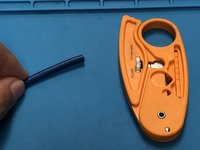
      • Use your wire stripper to cut the outer sheath

      • Do Not Rotate more than 3-4 times as it will cut the wires underneath.

      • when the length of exposed wires are at a decent length (a little less than a thumbs length) separate the wires by color.

      Ask FixBot

      Add Comment

    3. How to Wire a RJ-45 KeyStone Jack: step 3, image 1 of 3 How to Wire a RJ-45 KeyStone Jack: step 3, image 2 of 3 How to Wire a RJ-45 KeyStone Jack: step 3, image 3 of 3
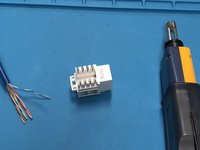
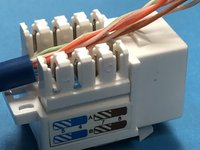
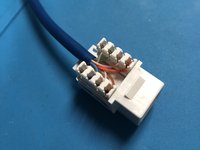
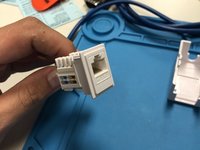
      • on the keystone jack you will see colors. line the wires up to the corresponding colors (white blue - blue, white orange - orange, etc.)

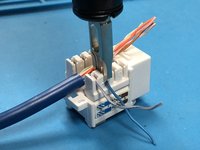
      • use the punchdown tool with the longer side of the blade on the outside to punch the wires in and it will cut off the excess.

      • repeat for each color

      Ask FixBot

      Add Comment

    4. How to Wire a RJ-45 KeyStone Jack: step 4, image 1 of 3 How to Wire a RJ-45 KeyStone Jack: step 4, image 2 of 3 How to Wire a RJ-45 KeyStone Jack: step 4, image 3 of 3
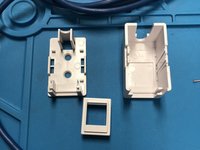
      • open up your mounting box

      • there should be a frame for your jack to snap into

      Ask FixBot

      Add Comment

    5. How to Wire a RJ-45 KeyStone Jack: step 5, image 1 of 2 How to Wire a RJ-45 KeyStone Jack: step 5, image 2 of 2
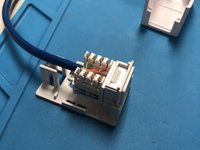
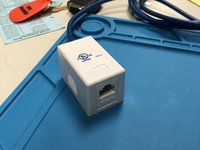
      • place the jack into the mounting box, there should be places for zip ties to hold the cable in place

      • place the cover on top and you are done with your cable!

      • test the line using a cable tester.

      Ask FixBot

      Add Comment

Conclusion

Make Sure to test with a cable tester

Cancel: I did not complete this guide.

6 other people completed this guide.

Samuel Lynch

Member since: 04/24/18

293 Reputation

1 Guide authored

Team

Sams TechRepair Member of Sams TechRepair

Business

1 Member

12 Guides authored

0 Guide Comments

Add Comment

View Statistics:

Past 24 Hours: 4

Past 7 Days: 63

Past 30 Days: 272

All Time: 25,676