Free Shipping on Domestic Orders $75+

How to Replace or Clean a Macbook Key

What you need

    1. How to Replace or Clean a Macbook Key, How to Replace or Clean a Macbook Key: step 1, image 1 of 1
      • Stick your finger underneath the key. Gently pry it up.

      • You may need a spudger or flathead screwdriver to remove the key.

      Ask FixBot

      Add Comment

    2. How to Replace or Clean a Macbook Key: step 2, image 1 of 1
      • Now, carefully use your spudger or small flathead to, very gently, pry up the key mechanism, being careful not to damage it.

      • You should now clean the key using a Q-tip, and taking the key and mechanism and put it in water and dry it out. It's not too hard to put the mechanism back together again. Or use a can of compressed air.

      Ask FixBot

      Add Comment

    3. How to Replace or Clean a Macbook Key: step 3, image 1 of 1
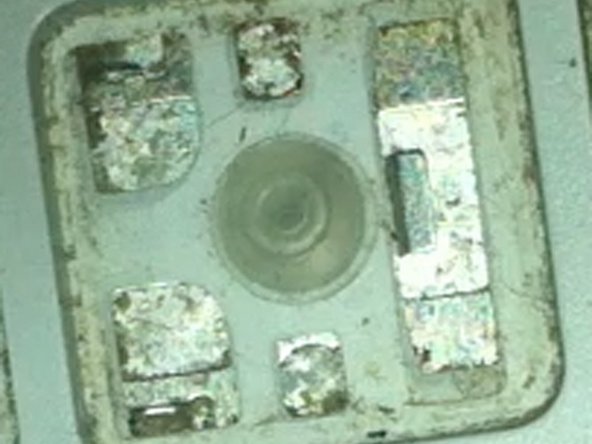
      • Once you have removed and cleaned the key (or have not cleaned) take a close look at the key. There is a big hook on the right side, and two smaller hooks on the top left and bottom left.

      Ask FixBot

      Add Comment

    4. How to Replace or Clean a Macbook Key: step 4, image 1 of 1
      • Now what you want to do, is hold the mechanism flat side up. Put the mechanism into the hook on the right side. A spudger or small flathead might help.

      Ask FixBot

      Add Comment

    5. How to Replace or Clean a Macbook Key: step 5, image 1 of 1
      • Now pop in the two pins on the bottom left and top left into their hooks using a small spudger or flathead.

      Ask FixBot

      Add Comment

    6. How to Replace or Clean a Macbook Key: step 6, image 1 of 1
      • Now, take the key cap and pop it back on the computer.

      • When you put the key back on, press it a few times to make sure the mechanism doesn't come out.

      • Now test the keyboard, verifying that everything works.

      Ask FixBot

      Add Comment

Conclusion

That was the guide on how to clean the keys on a MacBook.

Cancel: I did not complete this guide.

19 other people completed this guide.

Brandon Sky Pimenta

Member since: 09/09/12

1,407 Reputation

1 Guide authored

1 Guide Comment

Awesome article about mac laptop key replacement

Andrew Mac

http://www.replacementlaptopkeys.com/

James lee - Reply Share

Add Comment

View Statistics:

Past 24 Hours: 7

Past 7 Days: 75

Past 30 Days: 339

All Time: 80,177