
How to Replace a Kitchen Sink

M.hmza Daghstani and 2 other contributors
Last updated on Nov 1, 2023
Views: 3.3K
View statistics:
- Past 24 Hours:
- 8
- Past 7 Days:
- 54
- Past 30 Days:
- 204
- All Time:
- 3,252
Comments: 1
1 guide comment.
Go to guide commentsCompleted: 2 3
2 people have marked this guide "completed." Will you be next?
3 people have marked this guide "completed." Including you — great job!
Favorites: 1 2
1 person has favorited (and subscribed to) this guide. Will you be next?
2 people have favorited (and subscribed to) this guide — including you!
Inconsistent Images
Updating the images on this guide to be more consistent with the prerequisites would increase its awesomeness.
Needs Better Images
Better photos will improve this guide. Help out by taking, editing, or uploading new ones!
Needs More Images
A few more images would make this guide's procedures crystal clear.
Missing Details
Some of this guide's details are missing. Help users by adding tools, difficulty, or time.
Introduction
Go to step 1 ↓The following guide will demonstrate to you how to replace your kitchen sink in 6 simple steps. The guide includes images and visual representations to aid in understanding each step. If you have water leakage in the sink or you just want to replace it, this guide will help. Make sure you consult your landlord before attempting the replacement to avoid legal issues. Before using this guide, make sure you have a similar sink setup, some sinks are engineered differently and would require a different process. Sinks can rust over time and end up leaking which is why it is important to replace your sink. Another reason to replace your sink would be dirt or bacteria, some houses/apartments date back decades. Imagine all the dirt and bacteria that is piled up. Installing a new sink will give you the ease of mind and let you rest knowing your sink is clean and ready to go! Be cautious when attempting the replacement, breaking/damaging the countertop, pipes can lead to bigger more complex issues. Consult with someone if you have any uncertainties regarding the replacement process.
What you need
Tools


-
-
-
Clear out the area for easy access. Place a disposable mat under the sink to make cleaning easier.
 Ask FixBot
-
-
-
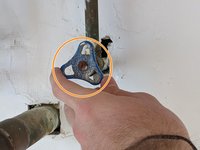
Turn off the water supply prior to starting the repair process.
-
After turning off the water supply, turn on the water faucet for 30 seconds to relieve water pressure from the pipes.
-
-
-
-
Silicone caulk is used to hold the sink to the countertop and prevent water leakage or to prevent the sink from shifting. Remove the caulk by gently scrubbing the caulk off the edges using a utility knife.
-
After removing the caulk adhesive, you should be able to gently lift up the sink and remove it from its place.
-
-
-
After making sure the new sink fits, apply the silicone caulk between the sink and the countertop then gently place the sink back in place while applying a bit of pressure to activate the adhesive.
-
Let the caulk adhesive dry for 12 hours before using the sink again.
-
-




To reassemble your device, follow these instructions in reverse order.
Cancel: I did not complete this guide.
2 other people completed this guide.

Team

York University, Team S1-G7, Melo-Thaiss Winter 2021 Member of York University, Team S1-G7, Melo-Thaiss Winter 2021
YORK-MELO-THAISS-W21S1G7
1 Member
12 Guides authored
