Free Shipping on Domestic Orders $75+

How to Force Shutdown your Portable Power Station

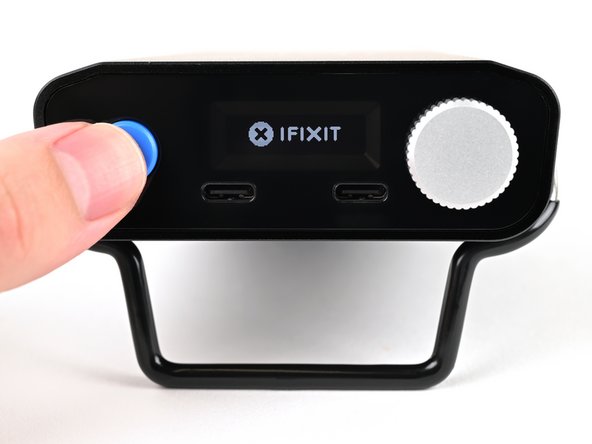
    1. How to Force Shutdown your Portable Power Station, Force shut down your power station: step 1, image 1 of 3 How to Force Shutdown your Portable Power Station, Force shut down your power station: step 1, image 2 of 3 How to Force Shutdown your Portable Power Station, Force shut down your power station: step 1, image 3 of 3
      • Hold down the blue action button for ten seconds to force shut down your power station.

      • If your power station displays anything on its screen, disregard it and continue holding to complete the force shutdown.

      • Wait ten seconds before continuing.

      Ask FixBot

      Add Comment

    2. How to Force Shutdown your Portable Power Station, Turn on your power station: step 2, image 1 of 2 How to Force Shutdown your Portable Power Station, Turn on your power station: step 2, image 2 of 2
      • Press and hold the blue action button for three seconds to turn on the power station.

      • The iFixit logo will appear while the power station is turning on.

      Ask FixBot

      Add Comment

Conclusion

Still need help? Please contact our customer support.

Cancel: I did not complete this guide.

3 other people completed this guide.

Kara Piepenbrink

Member since: 05/31/24

8,300 Reputation

21 Guides authored

Team

iFixit Member of iFixit

Staff

122 Members

72,401 Guides authored

1 Guide Comment

FixHub Multifunktionale Powerstation Nach kaufen geht das

Louis F - Reply Share

Add Comment

View Statistics:

Past 24 Hours: 3

Past 7 Days: 20

Past 30 Days: 94

All Time: 1,433