Free Shipping on Domestic Orders $75+

Honeywell HT900C Motor Replacement

What you need

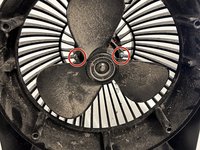
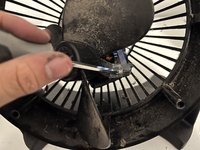
  1. Honeywell HT900C Motor Replacement, Motor: step 1, image 1 of 3 Honeywell HT900C Motor Replacement, Motor: step 1, image 2 of 3 Honeywell HT900C Motor Replacement, Motor: step 1, image 3 of 3
    • Remove the six 15 mm screws securing the fan's frame to its outer ring on the back using a Phillips #1 screwdriver.

    • Due to the small size of the screw holes, a long and thin screwdriver may be necessary.

    Ask FixBot

    Add Comment

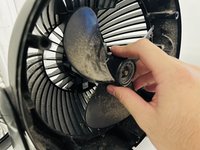
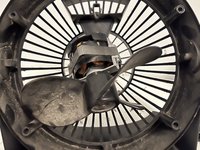
  2. Honeywell HT900C Motor Replacement: step 2, image 1 of 3 Honeywell HT900C Motor Replacement: step 2, image 2 of 3 Honeywell HT900C Motor Replacement: step 2, image 3 of 3
    • To gain access to the fan's inner workings, gently pull the blade cover away from the main body.

    Ask FixBot

    Add Comment

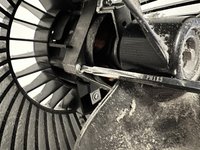
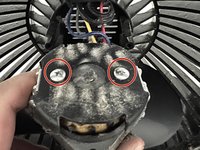
  3. Honeywell HT900C Motor Replacement: step 3, image 1 of 2 Honeywell HT900C Motor Replacement: step 3, image 2 of 2
    • Remove the two 36 mm screws from the metal plate located behind the blades using a Phillips #1 screwdriver.

    • The screws can be hard to remove so you may need to twist the screwdriver harder and screws can be removed easily.

    Ask FixBot

    Add Comment

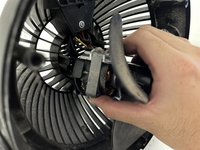
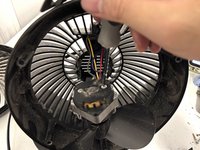
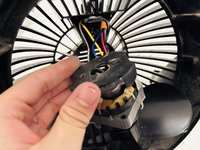
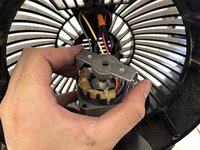
  4. Honeywell HT900C Motor Replacement: step 4, image 1 of 3 Honeywell HT900C Motor Replacement: step 4, image 2 of 3 Honeywell HT900C Motor Replacement: step 4, image 3 of 3
    • Carefully pull the motor it out of its resting position and tilt it forward to access the back of the motor.

    Ask FixBot

    Add Comment

  5. Honeywell HT900C Motor Replacement: step 5, image 1 of 3 Honeywell HT900C Motor Replacement: step 5, image 2 of 3 Honeywell HT900C Motor Replacement: step 5, image 3 of 3
    • Remove two 10 mm screws from the motor's back using a Phillips #1 screwdriver.

    Ask FixBot

    Add Comment

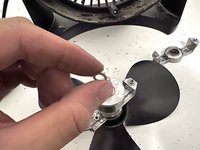
  6. Honeywell HT900C Motor Replacement: step 6, image 1 of 2 Honeywell HT900C Motor Replacement: step 6, image 2 of 2
    • Remove the 20 mm screws beside the fan blade using a Phillips #1 screwdriver.

    • The screws are attached to two parts of the motor so it can easily fall off after removing the screws.

    Ask FixBot

    Add Comment

  7. Honeywell HT900C Motor Replacement: step 7, image 1 of 1
    • Carefully remove the circular motor from the square holder.

    • The circular motor is still connected to the fan blades.

    Ask FixBot

    Add Comment

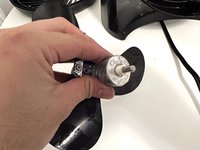
  8. Honeywell HT900C Motor Replacement: step 8, image 1 of 2 Honeywell HT900C Motor Replacement: step 8, image 2 of 2
    • Remove the metal washer from the axle.

    Ask FixBot

    Add Comment

  9. Honeywell HT900C Motor Replacement: step 9, image 1 of 1
    • Replace the old motor with a new one, and you're done!

    • Using the lubricant to easily put the new motor back.

    • Always double-check that the screws are securely in place.

    Ask FixBot

    Add Comment

Conclusion

To reassemble your device, follow these instructions in reverse order.

Cancel: I did not complete this guide.

One other person completed this guide.

Duy Anh Nguyen

Member since: 09/17/22

169 Reputation

1 Guide authored

Team

0 Guide Comments

Add Comment

View Statistics:

Past 24 Hours: 1

Past 7 Days: 26

Past 30 Days: 102

All Time: 1,791