
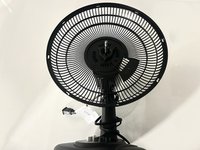
Holmes Table Fan 12" Fan Blade Replacement

Emily Contreras and 3 other contributors
Last updated on Dec 18, 2023
Views: 2.6K
View statistics:
- Past 24 Hours:
- 3
- Past 7 Days:
- 29
- Past 30 Days:
- 112
- All Time:
- 2,624
Comments: 0
No one has left comments on this guide. Will you be first?
Go to guide commentsCompleted: 7 8
7 people have marked this guide "completed." Will you be next?
8 people have marked this guide "completed." Including you — great job!
Favorites: 0 1
No one has favorited (and subscribed to) this guide. Will you be the first?
1 person has favorited (and subscribed to) this guide — and that's you!
Introduction
Go to step 1 ↓As you walk through this guide you will successfully achieve your attempt to replace the blade of your 12 inch Holmes table model #32510380. Although a simple repair be aware that this task may take more force than usual to attain your final product.
This link is the manual that helped aid in identifying parts and helped us deconstruct the fan.

 Ask FixBot




To reassemble your device, follow these instructions in reverse order.
Cancel: I did not complete this guide.
7 other people completed this guide.

Team

Sam Houston State, Team 1-11, Bennett Fall 2023 Member of Sam Houston State, Team 1-11, Bennett Fall 2023
SHSU-BENNETT-F23S1G11
3 Members
12 Guides authored
