
Hitachi CP-X440 Motherboard Replacement

Abby Myers and 4 other contributors
Last updated on Jun 25, 2025
Views: 553
View statistics:
- Past 24 Hours:
- 1
- Past 7 Days:
- 12
- Past 30 Days:
- 54
- All Time:
- 553
Comments: 0
No one has left comments on this guide. Will you be first?
Go to guide commentsCompleted: 0 1
No one has marked this guide "completed." Will you be the first?
1 person has marked this guide "completed." It's you — great job!
Favorites: 0 1
No one has favorited (and subscribed to) this guide. Will you be the first?
1 person has favorited (and subscribed to) this guide — and that's you!
Better Introduction
Improve this guide by completing or revising its introduction.
Introduction
Go to step 1 ↓This guide will show you how to disassemble the projector acting as a supplemental guide for the other replacement guides for this device. Many of the parts that may need replacing in the projector require the device to be disassembled.
Before beginning disassembly, be sure the projector is unplugged from any outlets.
What you need
Tools
-
-
Spudger4.9


-
-
-
Turn the projector upside down so the bottom is facing up.
-
Using a Phillips #1 screwdriver remove the six black 2 mm screws.
 Ask FixBot
-
-
-
Flip the projector right-side up and navigate to the back panel.
-
Remove the three black 10 mm screws on the back panel with a Phillips #1 screwdriver.
-
Remove the two silver 10 mm screws on the power switch panel with a Phillips #1 screwdriver.
-
-
-
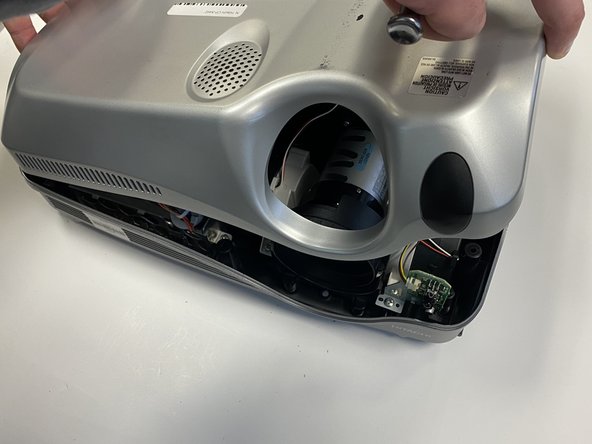
Now turn the projector so the front is facing you.
-
Gently remove the lid from the bottom of the projector so the green circuit board is exposed.
-
-
-
-
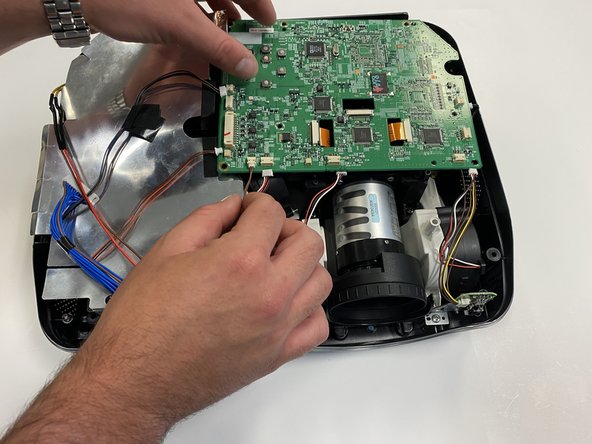
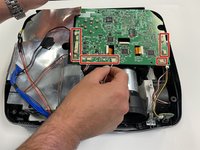
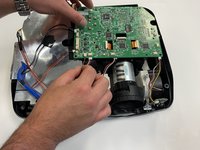
Gently pull out the three orange ribbons from their white connectors on the circuit board.
-
-
-
Remove the five silver 5 mm screws on the circuit board with a Phillips #2 screwdriver.
-
-





To reassemble your device, follow these instructions in reverse order.

Team

University of Alabama, Team 2-2, Bedsole Spring 2022 Member of University of Alabama, Team 2-2, Bedsole Spring 2022
UA-BEDSOLE-S22S2G2
4 Members
72 Guides authored
