
Hitachi CP-X2010N Air Filter Replacement

Chance Kidd and 2 other contributors
Last updated on Dec 22, 2022
Views: 473
View statistics:
- Past 24 Hours:
- 2
- Past 7 Days:
- 16
- Past 30 Days:
- 54
- All Time:
- 473
Comments: 0
No one has left comments on this guide. Will you be first?
Go to guide commentsCompleted: 5 6
5 people have marked this guide "completed." Will you be next?
6 people have marked this guide "completed." Including you — great job!
Favorites: 0 1
No one has favorited (and subscribed to) this guide. Will you be the first?
1 person has favorited (and subscribed to) this guide — and that's you!
Featured Student Guide
This guide has been the hard work of our awesome students and is found to be exceptionally cool by the iFixit staff.
Introduction
Go to step 1 ↓This is the most common but also the easiest component to replace on the Hitachi CP-X2010N projector. The air filter is responsible for cleaning the air that circulates through your device. If you notice excessive fan noise or difficulty keeping temperature down, the air filter might be dirty or clogged. The air filter will need replacement more often if the projector is operating in a dusty environment.
-
-
-
Lift the front of the projector up so the air filter tray is easily accessible.
 Ask FixBot
-
-
-
-
Grab the handle at the bottom of the device and pull the air filter straight out.
-
-
-
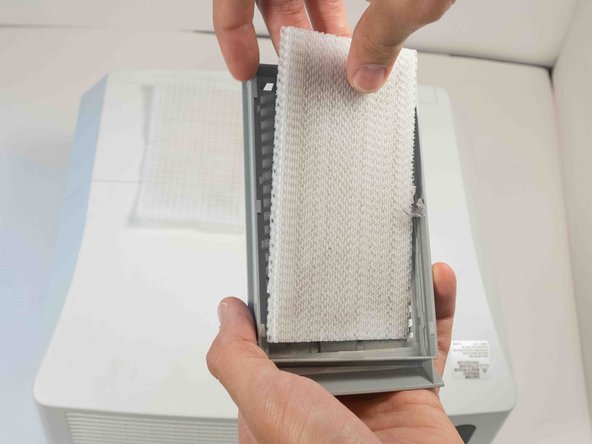
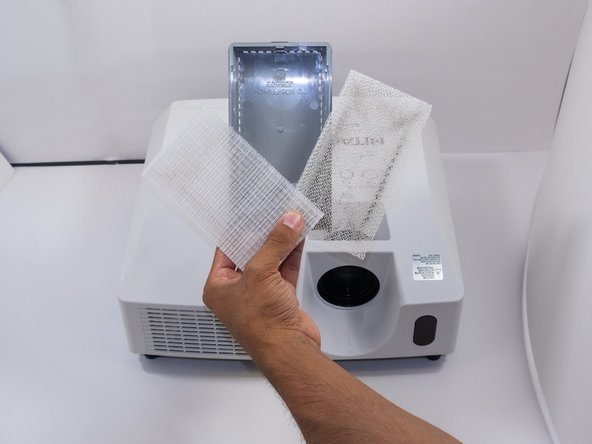
There are two filters in the tray. The top one is a fine mesh, and the bottom is a coarse mesh. Remove the fine mesh filter first.
-
Finally, remove the coarse mesh filter.
-
-


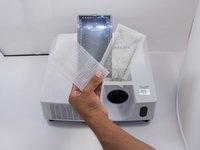
To reassemble your device, follow these instructions in reverse order.
Cancel: I did not complete this guide.
5 other people completed this guide.

Team

Austin Community College, Team 9-2, Watkins Fall 2022 Member of Austin Community College, Team 9-2, Watkins Fall 2022
AUSTINCC-WATKINS-F22S9G2
4 Members
72 Guides authored
