Introduction
If you are experiencing issues with the camera on your Hisense Sero 8 device due to prolonged use, you can fix it by replacing the front and back camera sets. This guide will help you to repair the camera set. Before you begin, please check the troubleshooting guide to see the symptoms of your device.
What you need
-
-
-
Use an opening tool to pry open a corner of the device, then slide the tool down the side of the device to completely open it.
 Ask FixBot
-
-
-
Tool used on this step:Tweezers$4.99
-
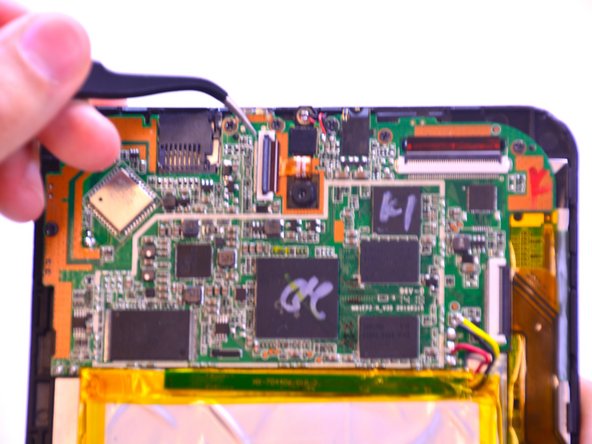
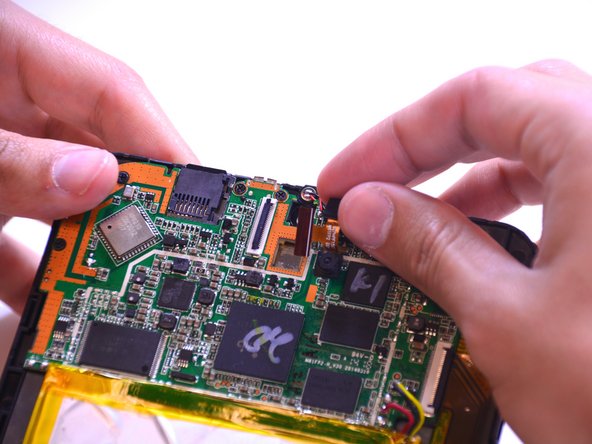
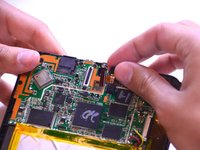
Use the pointed end of the spudger to lift the camera from the motherboard.
-
Use tweezers to carefully pull out the camera set.
-
-



To reassemble your device, follow these instructions in reverse order.
Cancel: I did not complete this guide.
One other person completed this guide.

Team

USF Tampa, Team 1-2, Leahy Winter 2015 Member of USF Tampa, Team 1-2, Leahy Winter 2015
USFT-LEAHY-W15S1G2
3 Members
60 Guides authored
