Introduction
This guide walks you through how to open up the Heyday Wireless Speaker 0574 so that you can access its internal components. Whether you're replacing the battery, or motherboard. The Heyday 0574 is a compact Bluetooth speaker with a built-in rechargeable battery that can also be physically replaced, but over time issues like poor audio quality, power problems, or unresponsive buttons may indicate you need to perform a repair.
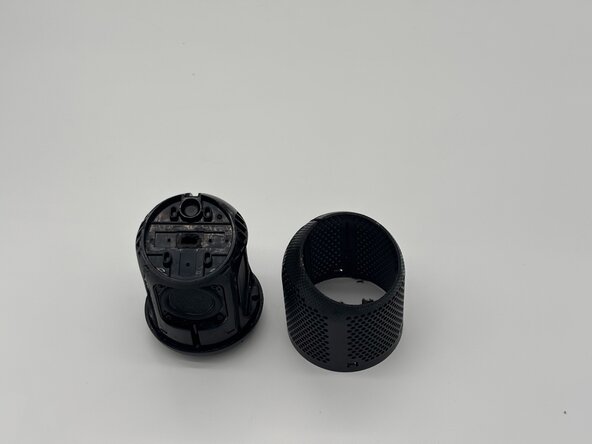
If your speaker is showing symptoms such as distorted sound, failing to charge, or unresponsive controls, this guide will help you safely remove the outer grille and plastic cover to expose the internal parts.
Safety and Preparations
- Make sure the speaker is powered off and disconnected from any charger before you begin
- Be carful around fragile parts and connectors when removing the cover. For example, there's a cable attaching the grille or plastic shell to the motherboard.
- Cutting the speaker's mesh netting cannot be undone, so take that into considerations when going through with this guide.
What you need
-
-
-
Use a razor blade to cut open the speaker along the speaker's net lining.
 Ask FixBot
-
-
-
Use four opening picks to pry open the bottom cover.
-
Twist and lift the cover off.
-
-
-
-
Use the a Phillips #1 screwdriver to remove the five 8 mm-long screws located on the bottom of the speaker.
-
-




To reassemble your device, follow these instructions in reverse order.

Team

University of North Texas, Team 7-6, Kilpatrick Fall 2025 Member of University of North Texas, Team 7-6, Kilpatrick Fall 2025
UNT-KILPATRICK-F25S7G6
4 Members
48 Guides authored
