Free Shipping on Domestic Orders $75+

Hasee Z7M-i78172D1 Screen Replacement

What you need

    1. Hasee Z7M-i78172D1 Screen Replacement, Screen: step 1, image 1 of 2 Hasee Z7M-i78172D1 Screen Replacement, Screen: step 1, image 2 of 2
      • Remove the stickers covering the screws. These are located on both corners of the screen. (Two in total)

      • Remove the two 7mm screws.

      Ask FixBot

      Add Comment

    2. Hasee Z7M-i78172D1 Screen Replacement: step 2, image 1 of 3 Hasee Z7M-i78172D1 Screen Replacement: step 2, image 2 of 3 Hasee Z7M-i78172D1 Screen Replacement: step 2, image 3 of 3
      • Use a plastic opening tool to pull the plastic screen bezel forward.

      • Remove the 4 7mm screws in the corners holding the screen up.

      • Use a plastic oping tool to pry the screen forward. Lay it on the keyboard.

      Ask FixBot

      Add Comment

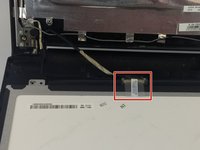
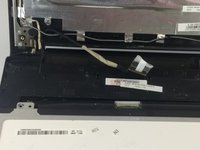
    3. Hasee Z7M-i78172D1 Screen Replacement: step 3, image 1 of 2 Hasee Z7M-i78172D1 Screen Replacement: step 3, image 2 of 2
      • Peel off the tape that connects the chord to the screen.

      • Carefully unplug chord.

      Ask FixBot

      Add Comment

Conclusion

To reassemble your device, follow these instructions in reverse order.

Cancel: I did not complete this guide.

One other person completed this guide.

Desiree Mora

Member since: 02/14/18

304 Reputation

3 Guides authored

Team

USF Tampa, Team S6-G6, Eyestone Spring 2018 Member of USF Tampa, Team S6-G6, Eyestone Spring 2018

USFT-EYESTONE-S18S6G6

3 Members

72 Guides authored

0 Guide Comments

Add Comment

View Statistics:

Past 24 Hours: 6

Past 7 Days: 14

Past 30 Days: 82

All Time: 2,165