
Hannspree Hannspad SN1AT71 Back Panel Replacement

matthew vandeventer and 9 other contributors
Last updated on Jan 5, 2021
Views: 2.9K
View statistics:
- Past 24 Hours:
- 2
- Past 7 Days:
- 18
- Past 30 Days:
- 95
- All Time:
- 2,862
Comments: 0
No one has left comments on this guide. Will you be first?
Go to guide commentsCompleted: 4 5
4 people have marked this guide "completed." Will you be next?
5 people have marked this guide "completed." Including you — great job!
Favorites: 0 1
No one has favorited (and subscribed to) this guide. Will you be the first?
1 person has favorited (and subscribed to) this guide — and that's you!
Introduction
Go to step 1 ↓The Hannspad has a deceptive back panel that will not separate. Don't lose hope. This is not the real back panel, it is just there for aesthetics. The actual way to take the back panel off is at the seam around the edge of the screen. Follow these steps to protect your screen and easily take the back panel off your Hannspad.
What you need
Tools


-
-
-
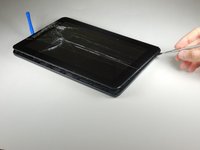
Use the metal spudger to press an opening between the screen and back cover.
-
The plastic tabs are located on each corner of the back cover.
-
-
-
Wedge the plastic opening tool between the screen and the back panel to prevent re-engagement
-
-
-
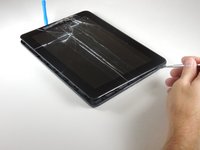
Slide the metal spudger around the casing to separate it from the inside of the tablet.
-
-
-
-
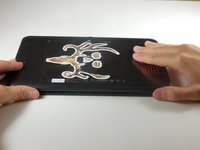
Flip the tablet over so the screen side is down after all the tabs are separated.
-
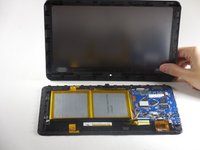
Remove the back panel by delicately lifting it straight up.
-

 Ask FixBot




To reassemble your device, follow these instructions in reverse order.
Cancel: I did not complete this guide.
4 other people completed this guide.

Team

Colorado Springs, Team 9-4, Panko Spring 2015 Member of Colorado Springs, Team 9-4, Panko Spring 2015
UCCS-PANKO-S15S9G4
3 Members
60 Guides authored
