Free Shipping on Domestic Orders $75+

Hamilton G5 Ventilation Unit Motherboard Replacement

Views: 640

View statistics:

Past 24 Hours:
2
Past 7 Days:
14
Past 30 Days:
59
All Time:
640
Comments: 0

No one has left comments on this guide. Will you be first?

Go to guide comments
Completed: 0

No one has marked this guide "completed." Will you be the first?

Favorites: 0

No one has favorited (and subscribed to) this guide. Will you be the first?

Time Required: 10 minutes
Difficulty: Easy
Hamilton G5 Ventilation Unit Motherboard Replacement
Medical Equipment Neither iFixit nor this repair guide is endorsed by or affiliated with the medical device manufacturer.

Introduction

Go to step 1 ↓

For more information on replacing the motherboard, please refer to section 10 in the service manual.

What you need

    1. Hamilton G5 Ventilation Unit Motherboard Replacement, Rail: step 1, image 1 of 1
      • Remove 4 Hex Allen screws (A) from the Rail surrounding the Ventilation Unit.

      Ask FixBot

      Add Comment

    2. Hamilton G5 Ventilation Unit Motherboard Replacement: step 2, image 1 of 1
      • Remove the Rail (B).

      Ask FixBot

      Add Comment

    3. Hamilton G5 Ventilation Unit Motherboard Replacement: step 3, image 1 of 1
      • The Standoff Brackets (C) remain with the Main Cover.

      Ask FixBot

      Add Comment

      • Place aside in a safe location.

      Ask FixBot

      Add Comment

    1. Hamilton G5 Ventilation Unit Motherboard Replacement, Main Cover: step 5, image 1 of 1
      • Lift the Main Cover (A) from the Ventilation Unit using the Standoff Brackets (B) attached to the Main Cover.

      Ask FixBot

      Add Comment

      • Place aside in a safe location.

      Ask FixBot

      Add Comment

    1. Hamilton G5 Ventilation Unit Motherboard Replacement, Ventilation Unit Motherboard: step 7, image 1 of 1
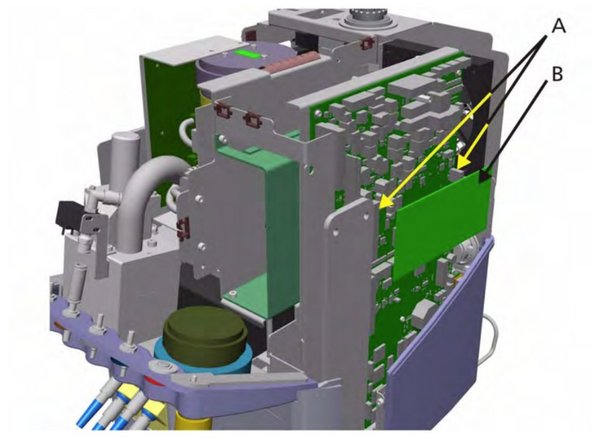
      • First, we need to remove the ESM module. It is connected to 2 connector sockets. Disconnect and remove.

      Ask FixBot

      Add Comment

      • Take out the Ventilation Real-time Controller (VRC) SW chip

      Ask FixBot

      Add Comment

    2. Hamilton G5 Ventilation Unit Motherboard Replacement: step 9, image 1 of 1
      • Install the ESM Module, by connecting the connectors (A), and the VRC SW chip on the new board.

      Ask FixBot

      Add Comment

    3. Hamilton G5 Ventilation Unit Motherboard Replacement: step 10, image 1 of 1
      • Disconnect all cables and connections from the board to the unit.

      Ask FixBot

      Add Comment

    4. Hamilton G5 Ventilation Unit Motherboard Replacement: step 11, image 1 of 1
      • Remove the three Hex screws (B).

      Ask FixBot

      Add Comment

    5. Hamilton G5 Ventilation Unit Motherboard Replacement: step 12, image 1 of 1
      • Move the motherboard out then up away from the ventilation unit (C).

      Ask FixBot

      Add Comment

Conclusion

To reassemble your device, follow these instructions in reverse order.

Cancel: I did not complete this guide.

Dane Dormedy

Member since: 04/08/20

349 Reputation

3 Guides authored

Team

Cal Poly, Team S7-G25, Paton Spring 2020 Member of Cal Poly, Team S7-G25, Paton Spring 2020

CPSU-PATON-S20S7G25

6 Members

132 Guides authored

0 Guide Comments

Add Comment

View Statistics:

Past 24 Hours: 2

Past 7 Days: 14

Past 30 Days: 59

All Time: 640