
Hamilton Beach 70730 Motor Replacement

Mack Bernard and 5 other contributors
Last updated on Dec 22, 2020
Views: 7.1K
View statistics:
- Past 24 Hours:
- 3
- Past 7 Days:
- 21
- Past 30 Days:
- 110
- All Time:
- 7,144
Comments: 9
2 comments on steps, 7 guide comments.
Go to guide commentsCompleted: 5 6
5 people have marked this guide "completed." Will you be next?
6 people have marked this guide "completed." Including you — great job!
Favorites: 0 1
No one has favorited (and subscribed to) this guide. Will you be the first?
1 person has favorited (and subscribed to) this guide — and that's you!
Missing Steps
Oops! This guide is currently missing one or more important steps.
Introduction
Go to step 1 ↓The Hamilton Beach 10-Cup Food Processor & Vegetable Chopper with Bowl Scraper (Model 70730) is a versatile machine that provides the functions of a food processor, food chopper, and vegetable chopper. The device has two speeds plus pulse and 450 watts of power.
This guide outlines the steps to replace the motor connecting the drive shaft to the chopping blade.
Warnings:
- Be sure device is unplugged before beginning replacement.
- Be aware of lubricant along the bottom of the drive shaft.
What you need
Tools


-
-
-
-
-
Using the metal spudger, remove the four adhesive plastic covers that hide the screws.
-
-
Tool used on this step:Tweezers$4.99
-
Remove any excess glue that is adhered to the screws with the precision tweezers.
-
-
-
-
-
Remove the four 8 mm JIS #1 screws that were revealed after removing the set of gears.
-
-
-
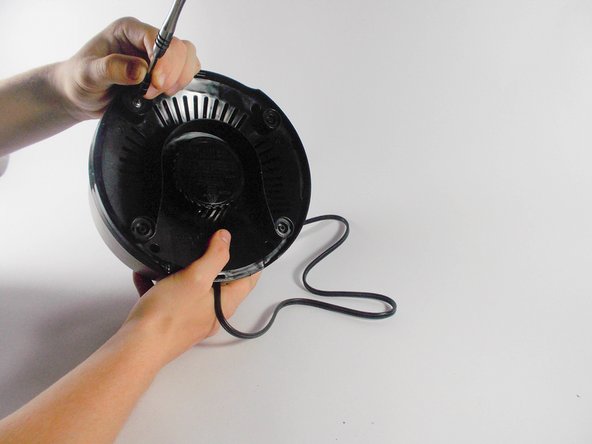
Using a JIS #1 screwdriver, remove each of the four suction cups that are attached to the bottom of the food processor.
-
-
-
-
Remove the two 4 mm screws underneath the on/off switch with a JIS #1 screwdriver.
-
-
-
Remove the white bracket and guide the wires away from their holders. Be careful not to dislodge the spring held inside the base.
-

 Ask FixBot




To reassemble your device, follow these instructions in reverse order.
Cancel: I did not complete this guide.
5 other people completed this guide.

Team

UMass Dartmouth, Team 2-4, Isaacson Spring 2016 Member of UMass Dartmouth, Team 2-4, Isaacson Spring 2016
UMASSD-ISAACSON-S16S2G4
3 Members
60 Guides authored
7 Guide Comments
Thanks for the guide! I would never have thought to dig through the grease in the gearbox to find the 4 machine screws buried under there. Turns out that my motor is fine, but the thermal fuse strapped to the windings burned out. $5 fix for a $150 device!
I didnt see any thermal fuse
Where do I find
On the bottom of the motor, connected to red lead, wrapped in white shielding
My Hamilton Beach food processor stopped working. So I ordered another bottom part(motor assembly) but t it will not come on either. Are they not interchangeable?
