Introduction
Over time, the battery in your HTC SMT 6175 may start to lose its ability to hold a charge or failure to power the device altogether, which is the case often with older phones. But replacing the battery can restore normal performance and extend the phone’s life without the need of a full replacement.
No special tools or technical skills are required for this process. It’s a simple replacement that only involves removing the back cover and swapping out the old battery. Be sure to power off the phone before beginning to avoid any short circuits or damage to the internal components.
-
-
-
-
Using both thumbs, push the back side of the phone's exterior up and remove the front face of the phone.
-
-
-
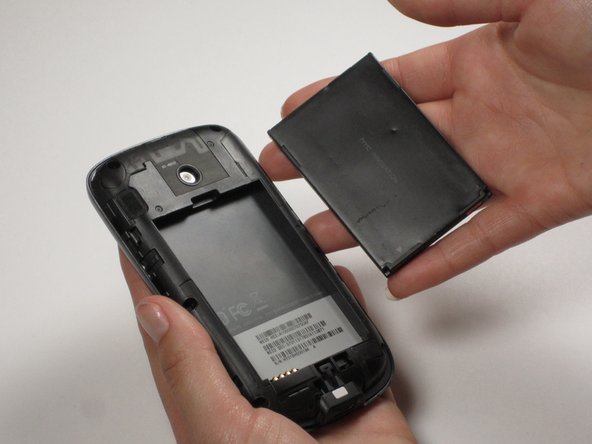
Insert your finger or a pry tool into the slot above the battery. Remove it and set aside.
-

 Ask FixBot


To reassemble your device, follow these instructions in reverse order.

Team

Cal Poly, Team 25-29, Garner Spring 2011 Member of Cal Poly, Team 25-29, Garner Spring 2011
CPSU-GARNER-S11S25G29
3 Members
60 Guides authored
