
HTC Rezound SD Card Replacement

Bridgette Mellon and
Last updated on May 17, 2018
Views: 540
View statistics:
- Past 24 Hours:
- 2
- Past 7 Days:
- 10
- Past 30 Days:
- 57
- All Time:
- 540
Comments: 0
No one has left comments on this guide. Will you be first?
Go to guide commentsCompleted: 0 1
No one has marked this guide "completed." Will you be the first?
1 person has marked this guide "completed." It's you — great job!
Favorites: 0 1
No one has favorited (and subscribed to) this guide. Will you be the first?
1 person has favorited (and subscribed to) this guide — and that's you!
Better Introduction
Improve this guide by completing or revising its introduction.
What you need

-
-
-
Use a plastic opening tool or your fingers to get into the groove between the cover and case. Remove the back covering so that the red battery is visible.
 Ask FixBot
-
-
-
-
-
-
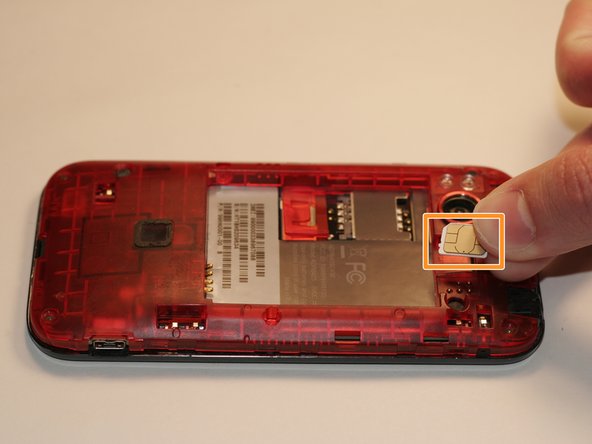
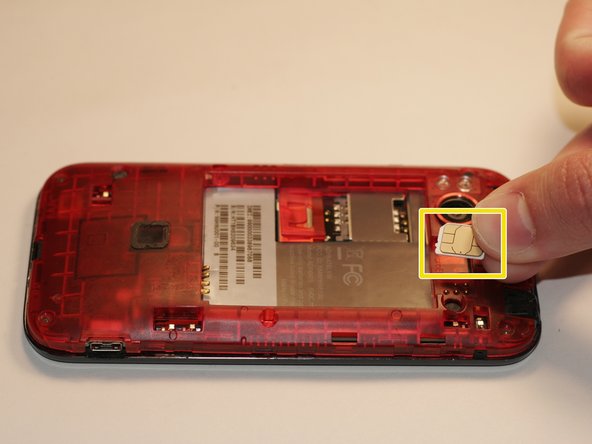
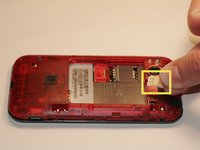
Take out SD card from slot above battery alcove.
-
Place new SD card in same slot.
-
-


To reassemble your device, follow these instructions in reverse order.

Team

University of Alabama, Team S3-G12, Bedsole Spring 2018 Member of University of Alabama, Team S3-G12, Bedsole Spring 2018
UA-BEDSOLE-S18S3G12
4 Members
60 Guides authored
