
HTC Maple 100 Battery Replacement

Andrew Van Meter and 7 other contributors
Last updated on Jan 8, 2020
Views: 1.6K
View statistics:
- Past 24 Hours:
- 0
- Past 7 Days:
- 11
- Past 30 Days:
- 39
- All Time:
- 1,616
Comments: 0
No one has left comments on this guide. Will you be first?
Go to guide commentsCompleted: 0 1
No one has marked this guide "completed." Will you be the first?
1 person has marked this guide "completed." It's you — great job!
Favorites: 0 1
No one has favorited (and subscribed to) this guide. Will you be the first?
1 person has favorited (and subscribed to) this guide — and that's you!
Missing Prerequisites
This guide is missing information on how to start the process. Make a prerequisite guide!
Introduction
Go to step 1 ↓This will demonstrate how to remove the battery in your HTC Maple 100 phone.

 Ask FixBot


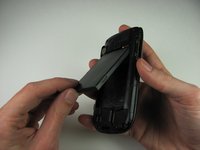
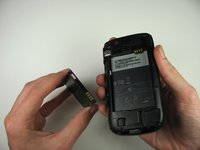
To reassemble your device, follow these instructions in reverse order.

Team

Cal Poly, Team 20-29, Maness Fall 2011 Member of Cal Poly, Team 20-29, Maness Fall 2011
CPSU-MANESS-F11S20G29
4 Members
108 Guides authored
