Free Shipping on Domestic Orders $75+

HTC HD2 Phone Speaker Replacement

What you need

  1. HTC HD2 Phone Speaker Replacement, Battery: step 1, image 1 of 1
    • Carefully pull the rear cover from the back of the phone.

    • Place a finger beneath the small lip on the left side of the battery.

    Ask FixBot

    Add Comment

  2. HTC HD2 Phone Speaker Replacement: step 2, image 1 of 2 HTC HD2 Phone Speaker Replacement: step 2, image 2 of 2
    • Lay the phone down on it's screen.

    • Lift up on the lip and pull the battery from the phone.

    Ask FixBot

    Add Comment

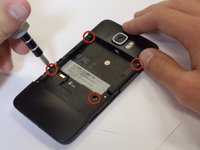
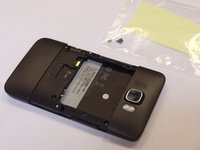
  3. HTC HD2 Phone Speaker Replacement, Midframe: step 3, image 1 of 2 HTC HD2 Phone Speaker Replacement, Midframe: step 3, image 2 of 2
    • Remove the four black 3.5mm T5 screws from the back of the phone.

    Ask FixBot

    Add Comment

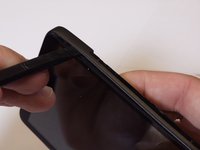
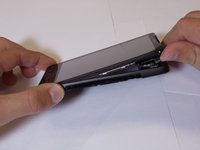
  4. HTC HD2 Phone Speaker Replacement: step 4, image 1 of 2 HTC HD2 Phone Speaker Replacement: step 4, image 2 of 2
    • Insert the flat end of a spudger between the midframe and the display.

    • Slide the spudger along the seam between the frame and the display.

    • Using the spudger for leverage, carefully pry the midframe away from the display assembly.

    • This process will take some effort. Continue to pry slowly and carefully until the frame begins to detach.

    • As it releases, pull the midframe away from the phone.

    • The volume control tab may fall off during removal. It can be easily reattached.

    Ask FixBot

    Add Comment

  5. HTC HD2 Phone Speaker Replacement, Phone Speaker: step 5, image 1 of 1
    • With the chassis removed, set down the phone and locate the speaker on the inside of the housing.

    • The speaker should be easily popped out of place with a small amount of force

    Ask FixBot

    Add Comment

  6. HTC HD2 Phone Speaker Replacement: step 6, image 1 of 1
    • Congratulations! The speaker is now removed and can be replaced or repaired.

    Ask FixBot

    Add Comment

Conclusion

To reassemble your device, follow these instructions in reverse order.

Cancel: I did not complete this guide.

One other person completed this guide.

Nathan Puchalski

Member since: 04/26/11

813 Reputation

5 Guides authored

Team

Cal Poly, Team 24-55, Amido Spring 2011 Member of Cal Poly, Team 24-55, Amido Spring 2011

CPSU-AMIDO-S11S24G55

5 Members

16 Guides authored

0 Guide Comments

Add Comment

View Statistics:

Past 24 Hours: 1

Past 7 Days: 9

Past 30 Days: 35

All Time: 7,312