Free Shipping on Domestic Orders $75+

HTC Droid Incredible 4G LTE Midframe Replacement

What you need

    1. HTC Droid Incredible 4G LTE Midframe Replacement, Battery: step 1, image 1 of 1
      • Use the plastic opening tool to pry off back cover by inserting opening tool in the space indicated and pushing down on the handle of the tool.

      Ask FixBot

      Add Comment

    2. HTC Droid Incredible 4G LTE Midframe Replacement: step 2, image 1 of 1
      • Remove the battery after taking off the cover.

      Ask FixBot

      Add Comment

    1. HTC Droid Incredible 4G LTE Midframe Replacement, Midframe: step 3, image 1 of 1
      • Remove eight 4mm and one 5mm Torx screws.

      Ask FixBot

      Add Comment

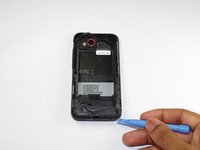
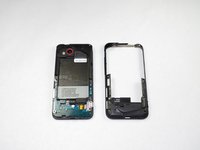
    2. HTC Droid Incredible 4G LTE Midframe Replacement: step 4, image 1 of 2 HTC Droid Incredible 4G LTE Midframe Replacement: step 4, image 2 of 2
      • Use a prying tool to pry off the midframe.

      Ask FixBot

      Add Comment

Conclusion

To reassemble your device, follow these instructions in reverse order.

Cancel: I did not complete this guide.

One other person completed this guide.

Tevin

Member since: 09/24/14

666 Reputation

4 Guides authored

Team

USF Tampa, Team 15-1, Remmell Fall 2014 Member of USF Tampa, Team 15-1, Remmell Fall 2014

USFT-REMMELL-F14S15G1

4 Members

48 Guides authored

0 Guide Comments

Add Comment

View Statistics:

Past 24 Hours: 0

Past 7 Days: 5

Past 30 Days: 31

All Time: 550