
HTC Desire 826 Battery Replacement

Jordan Warnix and 9 other contributors
Last updated on Jul 2, 2025
Views: 1.1K
View statistics:
- Past 24 Hours:
- 1
- Past 7 Days:
- 17
- Past 30 Days:
- 70
- All Time:
- 1,144
Comments: 0
No one has left comments on this guide. Will you be first?
Go to guide commentsCompleted: 1 2
1 person has marked this guide "completed." Will you be next?
2 people have marked this guide "completed." Including you — great job!
Favorites: 0 1
No one has favorited (and subscribed to) this guide. Will you be the first?
1 person has favorited (and subscribed to) this guide — and that's you!
Better Introduction
Improve this guide by completing or revising its introduction.
Introduction
Go to step 1 ↓If you need to install a new battery in your HTC Desire 826, access it with this guide.
What you need
Tools
-
-
-
Spudger4.9


-
-
-
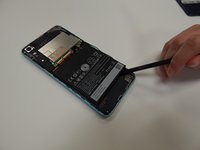
Find a seam in the back of the device.
-
Insert the plastic spudger into the seam and pry off the back panel.
 Ask FixBot
-
-
Tool used on this step:Tweezers$4.99
-
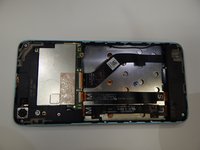
Remove the 4.0 mm screw above the battery with a T5 Torx screwdriver.
-
Remove the metal bracket with the tweezers.
-
-
-


To reassemble your device, follow these instructions in reverse order.
Cancel: I did not complete this guide.
One other person completed this guide.

Team

University of Alabama, Team S1-G2, Bedsole Fall 2019 Member of University of Alabama, Team S1-G2, Bedsole Fall 2019
UA-BEDSOLE-F19S1G2
4 Members
60 Guides authored
