Introduction
This guide will show you how to replace the back camera of your HTC Desire 826 device. This device allows for high resolution video and picture capturing.
Replacing the back camera of HTC Desire 826 can be because of damage to the lens, the device stops working and displays a black screen, or if it continues to make sounds like buzzing or it starts to vibrate. By replacing it, you'll have the typical quality of photos and a functioning camera.
Make sure to check if lens doesn't have any smudges, scratches or any debris. Try to clean and wipe off it off with clean microfiber cloth, carefully. If any issues occur or persist with the HTC Desire 826, take a look at HTC Desire 826 Troubleshooting for help.
Prior to starting, make sure to back up any data and power off device. When removing the battery, make sure to identify if any problems occur with the battery swelling or having a smell (don't put directly in your face to smell). Refer to Swollen Battery for help.
What you need
-
-
-
Find a seam in the back of the device.
-
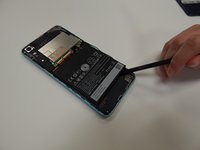
Insert the plastic spudger into the seam and pry off the back panel.
 Ask FixBot
-
-
Tool used on this step:Tweezers$4.99
-
Remove the 4.0 mm screw above the battery with a T5 Torx screwdriver.
-
Remove the metal bracket with the tweezers.
-
-
-
-
-
Tool used on this step:Tweezers$4.99
-
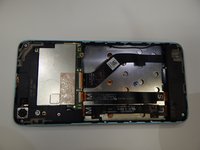
Use the spudger to lift the green board. The back camera is attached on the side as shown.
-
Use the tweezers to disconnect and remove the camera.
-




To reassemble your device, follow these instructions in reverse order. Take your e-waste to an R2 or e-Stewards certified recycler.

Team

University of Alabama, Team S1-G2, Bedsole Fall 2019 Member of University of Alabama, Team S1-G2, Bedsole Fall 2019
UA-BEDSOLE-F19S1G2
4 Members
60 Guides authored
