Introduction
This guide discusses how to replace the Charging Port and some other parts on the HTC Desire 626 by using some steps.
What you need
-
-
-
Insert plastic opening tool in between the back cover and grey plastic.
-
Gently work your way around the phone while sliding the tool.
-
Gently pry on plastic cover as needed to release fasteners.
 Ask FixBot
-
-
-
-
There are 7 screws you need to remove before prying the secondary cover off. You will need to use the JIS #000 screwdriver and the T5 Torx screwdriver to remove these screws.
-
There is a screw under the "void" sticker.
-
-
-
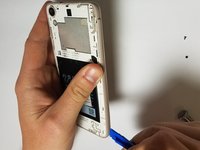
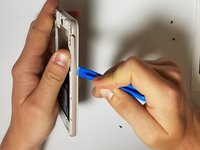
Once the screws are removed, use the plastic opening tool to remove the remaining plastic cover.
-
Start from the corners of the phone, and insert the plastic opening tool between the outer colored rim and the screen.
-
This portion of the cover will be more difficult to remove than the initial back cover. Be patient and gentle around the button holes.
-
-


To reassemble your device, follow these instructions in reverse order.
Cancel: I did not complete this guide.
One other person completed this guide.

Team

Oregon Institute of Technology, Team S2-G7, Lancaster Spring 2019 Member of Oregon Institute of Technology, Team S2-G7, Lancaster Spring 2019
OIT-LANCASTER-S19S2G7
3 Members
72 Guides authored
