What you need
-
-
-
Insert an opening pick between the back cover and chassis, and pry around the perimeter until the back cover releases.
-
Remove the back cover.
 Ask FixBot
-
-
-
Remove the "void" sticker over the screw near the top-right of the battery, and the larger one near bottom of the battery.
-
Use a Torx T5 screwdriver to remove the six screws.
-
Use a Phillips #000 screwdriver to remove the two screws.
-
-
-
-
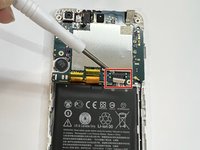
Use an ESD safe tool to carefully "walk" the battery connector out of its port.
-
Use an opening tool to lift the battery up and out of its housing.
-
-


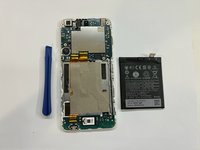
To reassemble your device, follow these instructions in reverse order.
Cancel: I did not complete this guide.
2 other people completed this guide.

Team

University of Memphis, Team 51-4, Willis Spring 2022 Member of University of Memphis, Team 51-4, Willis Spring 2022
UM-WILLIS-S22S51G4
1 Member
12 Guides authored
