
HTC Desire 530 Battery Replacement

Alyssa and 2 other contributors
Last updated on Apr 8, 2024
Views: 5.1K
View statistics:
- Past 24 Hours:
- 2
- Past 7 Days:
- 12
- Past 30 Days:
- 79
- All Time:
- 5,114
Comments: 4
1 comment on steps, 3 guide comments.
Go to guide commentsCompleted: 2 3
2 people have marked this guide "completed." Will you be next?
3 people have marked this guide "completed." Including you — great job!
Favorites: 0 1
No one has favorited (and subscribed to) this guide. Will you be the first?
1 person has favorited (and subscribed to) this guide — and that's you!
Introduction
Go to step 1 ↓This guide is meant to show you the steps required towards replacing or removing the battery from the HTC Desire 530. This is not a skillful task and anybody should be able to complete it with the right tools within a short amount of time. Battery replacement is a common issue within most smartphones and a new one will prolong your battery life, or if the device is not turning on, a battery replacement may be necessary
What you need


-
-
-
Use the plastic opening tools to remove the plastic speaker covers that are attached through an adhesive layer.
 Ask FixBot
-
-
-
Use the T5 Torx screwdriver to remove the four screws in each corner.
-
Make sure to take out any SD cards, located on the left side of the phone before proceeding to the next step.
-
Use the plastic opening tool to pry the front of the device off. Fully go around the front with the plastic opening tool before attempting to pull it off.
-
-
-
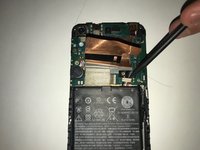
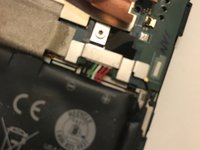
Dislocate the small piece with the wires connected using a nylon spudger.
-
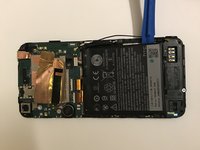
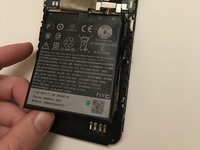
Loosen the adhesive layer for the battery by running a hair dryer over it briefly. After the adhesive is loosened you can pry the battery out with a plastic opening tool.
-
-
-




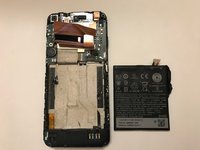
To reassemble your device, follow these instructions in reverse order.
Cancel: I did not complete this guide.
2 other people completed this guide.

Team

3 Guide Comments
Mi phone is sealed no scrows on my phone HTC Desire 530 so haw can i get the Battery out
My phone is sealed so awe can i get the Battery out it is HTC desire 530
