
HP dv5-1125nr CMOS Battery Replacement

Cory Mayer and 6 other contributors
Last updated on Sep 28, 2024
Views: 9.4K
View statistics:
- Past 24 Hours:
- 1
- Past 7 Days:
- 20
- Past 30 Days:
- 94
- All Time:
- 9,408
Comments: 0
No one has left comments on this guide. Will you be first?
Go to guide commentsCompleted: 10 11
10 people have marked this guide "completed." Will you be next?
11 people have marked this guide "completed." Including you — great job!
Favorites: 2 3
2 people have favorited (and subscribed to) this guide. Will you be next?
3 people have favorited (and subscribed to) this guide — including you!
Incorrect Tools
Help make this guide better by using the correct tools in images and/or text.
Introduction
Go to step 1 ↓The CMOS battery maintains the computer's startup settings as well as its internal clock. If your computer notifies you about changing this battery, it is best to do so immediately. Use this guide if you need to replace the CMOS battery in your HP dv5-1125nr.
What you need
Parts

Tools


-
-
-
Tool used on this step:Phillips #00 Screwdriver$5.49
-
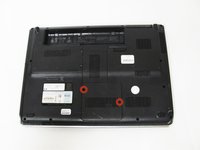
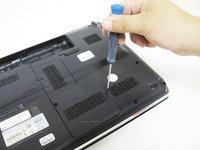
Remove these two 4mm Phillips screws on the back panel using a Phillips #00 screwdriver and remove the cover to reveal the CMOS battery
-
-
Tool used on this step:Flathead 3/32" or 2.5 mm Screwdriver$5.49
-
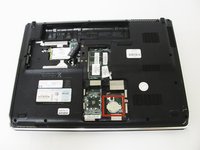
Locate the CR2032 watch battery
-
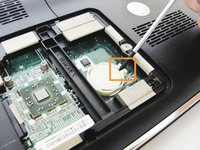
Using a 2.5mm flathead screwdriver, carefully pry up the battery using the tab to the right of the battery
-
-
-

 Ask FixBot





To reassemble your device, follow these instructions in reverse order.
Cancel: I did not complete this guide.
10 other people completed this guide.

Team

Cal Poly, Team 9-15, Regan Spring 2014 Member of Cal Poly, Team 9-15, Regan Spring 2014
CPSU-REGAN-S14S9G15
4 Members
120 Guides authored
