Introduction
If your HP Zbook 15u G2 does not hold a charge, or the battery does not last as long as it did before, you can replace the battery with a new one. This guide shows you how to replace the battery.
What you need
-
-
-
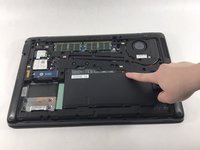
Turn the HP Zbook over and flip the switch at the top so the red part is visible.
 Ask FixBot
-
-
-
-
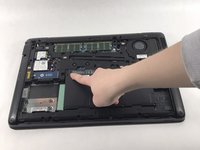
Lift the plastic tab at the top of the battery up to lift the battery up and out of the device
-
-



Conclusion
To reassemble your device, follow these instructions in reverse order.

Team

UMass Dartmouth, Team 3-5, Petersen Spring 2023 Member of UMass Dartmouth, Team 3-5, Petersen Spring 2023
UMASSD-PETERSEN-S23S3G5
4 Members
84 Guides authored
