Introduction
If the CD/DVD drive on your computer is broken and needs replacing, follow this replacement guide!
What you need
-
-
-
Flip the laptop over.
-
Slide the lever with the battery symbol beside it firmly until the battery pops out.
-
Remove the battery from the laptop.
 Ask FixBot
-
-
-
-
-
Slide the right lever firmly to the right.
-
Slide the cover towards yourself to remove it.
-
-
-
-
-
-
Unscrew the captive screw shown near the battery compartment with a Phillips #0 screwdriver.
-
-
-
Push outward on the metal optical drive tab with a metal spudger to unlock the drive from its position in the case.
-
Once the drive is protruding from the side of the computer, pull it the rest of the way out.
-
-


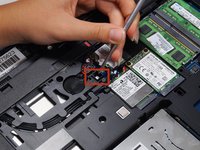
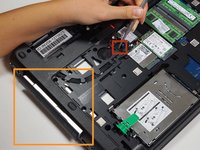
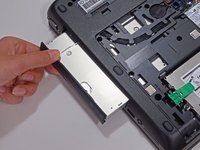
To reassemble your device, follow these instructions in reverse order.
Cancel: I did not complete this guide.
4 other people completed this guide.

Team

Cal Poly, Team 8-43, Amido Winter 2015 Member of Cal Poly, Team 8-43, Amido Winter 2015
CPSU-AMIDO-W15S8G43
4 Members
144 Guides authored
2 Guide Comments
Oddly enough, mine came with no DVD drive but a blanking… thing, which seems to be a trimmed-down version of this official adapter (HP SPS 734298-001) without the electronics. I bought a cheap chinese ODD caddy, tore it down and salvaged the logic board. Luckily, I got everything lined up after a few adjustments (the chinese logic board is a bit longer than the HP one).
Now I’m rocking an extra drive bay without paying the $75 some shops ask for the official one.
I use it as swappable storage (not hot-swappable, mind you) . Very handy for doing drive imaging and cloning when working as an IT technician out in the field.
