
HP Z2 Mini G3 CPU Fan Replacement

Christian Ogburn and 4 other contributors
Last updated on Apr 24, 2020
Views: 2.6K
View statistics:
- Past 24 Hours:
- 4
- Past 7 Days:
- 31
- Past 30 Days:
- 110
- All Time:
- 2,571
Comments: 0
No one has left comments on this guide. Will you be first?
Go to guide commentsCompleted: 1 2
1 person has marked this guide "completed." Will you be next?
2 people have marked this guide "completed." Including you — great job!
Favorites: 0 1
No one has favorited (and subscribed to) this guide. Will you be the first?
1 person has favorited (and subscribed to) this guide — and that's you!
Introduction
Go to step 1 ↓The CPU fan supports the HP Z2 Mini G3 (Model No. 1LE81UP#ABA) as a cooling mechanism. In case of malfunction or damage, this guide can direct end users to steps required to replace this cooling fan.
Before starting this replacement, check out our troubleshooting guide. The issue with your device may not require a replacement.
Be sure that the power is off and the A/C power cord has been disconnected before working on interior components. Removing hardware while the power is on could damage the device.
Components inside the device are also subject to static damage, so try and work on a hard surface to reduce this risk.
-
-
-
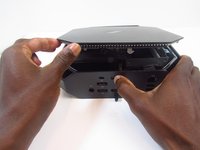
Slide and hold the latch in the direction of the engraved arrow (to the right).
-
-
-
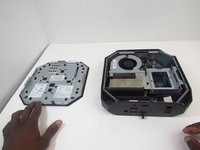
While holding the latch, lift the access panel upwards and towards yourself and set it aside upside-down.
-
-
-
-
Rotate the device so the front side is facing you (the side with the power button) and locate the CPU fan.
-
-
-
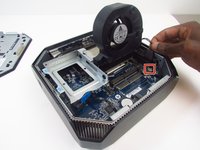
Carefully disconnect the CPU fan by pulling out the wires from the motherboard.
-
-
-
-
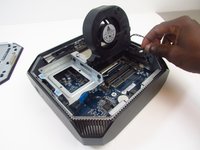
Swing the fan back down and carefully unhook the CPU fan notches by pulling each tab away from the heat sink holes.
-
-

 Ask FixBot






To reassemble your device, follow these instructions in reverse order.
Cancel: I did not complete this guide.
One other person completed this guide.

Team

Embry-Riddle Aeronautical University, Team S16-G4, Branham Spring 2020 Member of Embry-Riddle Aeronautical University, Team S16-G4, Branham Spring 2020
ERAU-BRANHAM-S20S16G4
3 Members
72 Guides authored
