
HP Windows Mixed Reality Controllers TPC-Q044 Shell Replacement

Clement Cheung and 4 other contributors
Last updated on Mar 6, 2019
Views: 1.3K
View statistics:
- Past 24 Hours:
- 0
- Past 7 Days:
- 17
- Past 30 Days:
- 62
- All Time:
- 1,299
Comments: 0
No one has left comments on this guide. Will you be first?
Go to guide commentsCompleted: 1 2
1 person has marked this guide "completed." Will you be next?
2 people have marked this guide "completed." Including you — great job!
Favorites: 0 1
No one has favorited (and subscribed to) this guide. Will you be the first?
1 person has favorited (and subscribed to) this guide — and that's you!
Introduction
Go to step 1 ↓Follow this guide to open the housing on your HP Windows Mixed Reality Controllers TPC-Q044.
This guide goes over steps for the left controller, but the process is identical for the right controller.
Because most of the components in this device are enclosed within the housing, replacement for nearly all parts will require you to follow these instructions to access the internals.
What you need
Tools
-
Spudger4.9


-
-
-
-
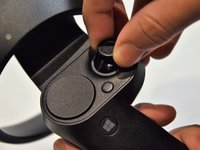
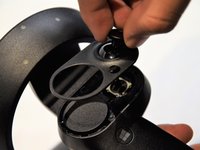
Grip the main body and pull the joystick outwards until the entire front panel pops off.
-
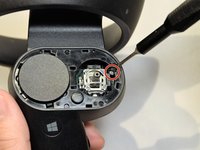
Remove the 6mm screw in the corner of the joystick well using a Phillips #00 screwdriver.
-
-
-
-
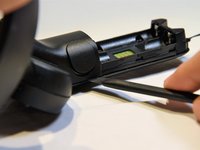
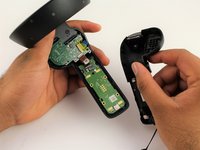
Use a spudger to pry apart the two halves of the assembly.
-
Work slowly, prying a small section at a time until the halves are completely separated.
-


 Ask FixBot




To reassemble your device, follow these instructions in reverse order.
Cancel: I did not complete this guide.
One other person completed this guide.

Team

Cal Poly, Team S18-G5, White Winter 2019 Member of Cal Poly, Team S18-G5, White Winter 2019
CPSU-WHITE-W19S18G5
2 Members
72 Guides authored
