
HP Touchsmart IQ506 RAM (Memory) Replacement

Last updated on Aug 31, 2025
Views: 1.4K
View statistics:
- Past 24 Hours:
- 3
- Past 7 Days:
- 23
- Past 30 Days:
- 105
- All Time:
- 1,364
Comments: 2
2 comments on steps.
Completed: 0 1
No one has marked this guide "completed." Will you be the first?
1 person has marked this guide "completed." It's you — great job!
Favorites: 0 1
No one has favorited (and subscribed to) this guide. Will you be the first?
1 person has favorited (and subscribed to) this guide — and that's you!
Community-Contributed Guide
An awesome member of our community made this guide. It was not created by iFixit staff.
Introduction
Go to step 1 ↓If your RAM has failed or you need to add more memory to your HP IQ500 Series AIO PC, this is how you would do the upgrade.
Maximum supported memory: 4GB
Required memory: DDR2 (SODIMM)
Supported speeds:
- PC2-4200 (533MHz)
- PC2-5300 (667 MHz)
- PC2- 6400 (800MHz)
Note: While the system accepts PC2-5300, it is hard to find. If you find it, it tends to be rather expensive compared to PC2-6400. Your cheapest option for DDR2 is going to be PC2-6400.
What you need
Parts
-
×2PC2-6400 4 GB RAM Chip$114.994.9
Important: This is UNOFFICIAL, not supported by HP and may not be stable. Try at your own risk!

Tools
-
Pro Tech Go Toolkit$49.954.9
The bits in the EET will suffice for this guide, but the additional tools could be useful in future repairs.

-
-
Tool used on this step:Essential Electronics Toolkit$29.95
-
If you are interested in a refurbished kit stock levels change frequently but can be found here.
 Ask FixBot
-
-
-
-
-
Unscrew the RAM door using a Phillips #1 screwdriver. Snap the RAM door off from the bottom and slide it off.
-
-
-
-
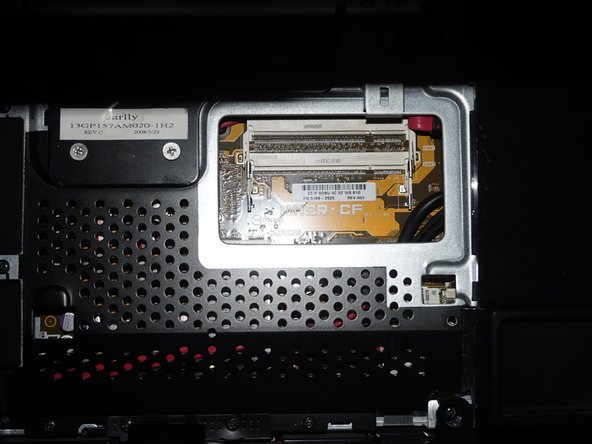
With the RAM exposed, remove the RAM from the slots on the system by pushing the tabs back. Once you do this the RAM will pop up and you can remove it.
-
Install the new RAM. Make sure you line the tab up on the memory with the slot in the system. It should only go in one way.
-




To reassemble your device, follow these instructions in reverse order.

