Free Shipping on Domestic Orders $75+

HP Stream x360 11-p015wm Keyboard Replacement

What you need

    1. HP Stream x360 11-p015wm Keyboard Replacement, Back Cover: step 1, image 1 of 2 HP Stream x360 11-p015wm Keyboard Replacement, Back Cover: step 1, image 2 of 2
      • Orient the laptop to have the back cover facing upwards.

      • Remove the four rubber pads located in each corner.

      Ask FixBot

      Add Comment

    2. HP Stream x360 11-p015wm Keyboard Replacement: step 2, image 1 of 1
      • Tool required: JIS #1 Screwdriver

      • Using the screwdriver, remove all of the exposed screws.

      Ask FixBot

      Add Comment

    3. HP Stream x360 11-p015wm Keyboard Replacement: step 3, image 1 of 2 HP Stream x360 11-p015wm Keyboard Replacement: step 3, image 2 of 2
      Tool used on this step:
      iFixit Opening Tool
      $1.99
      Buy
      • Tool required: iFixit opening tool

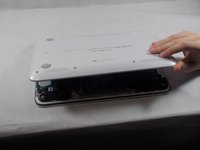
      • Open the laptop and orient the keyboard facing upward.

      • Slowly wedge the opening tool into the gap between the keyboard and the back cover.

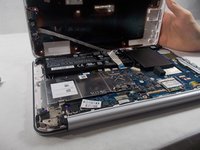
      • After loosening the back cover, close the laptop and orient the back cover facing upward. Open the cover.

      Ask FixBot

      Add Comment

    4. HP Stream x360 11-p015wm Keyboard Replacement: step 4, image 1 of 2 HP Stream x360 11-p015wm Keyboard Replacement: step 4, image 2 of 2
      Tool used on this step:
      Tweezers
      $3.99
      Buy
      • This is a good time to clean any accumulated dust or debris. Use this link on tips for cleaning.

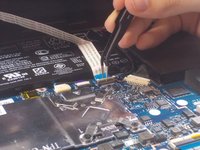
      • Tool required: Tweezers

      • Carefully use tweezers to remove the audio jack connector from the motherboard.

      Ask FixBot

      Add Comment

    1. HP Stream x360 11-p015wm Keyboard Replacement, Motherboard: step 5, image 1 of 1
      • Remove the six 6.5 mm Phillips head screws from the battery using the JIS #00 screwdriver.

      Ask FixBot

      Add Comment

    2. HP Stream x360 11-p015wm Keyboard Replacement: step 6, image 1 of 3 HP Stream x360 11-p015wm Keyboard Replacement: step 6, image 2 of 3 HP Stream x360 11-p015wm Keyboard Replacement: step 6, image 3 of 3
      • Unplug the wire attaching to the battery to the motherboard using the tweezers.

      • Remove the battery.

      Ask FixBot

      Add Comment

    3. HP Stream x360 11-p015wm Keyboard Replacement: step 7, image 1 of 2 HP Stream x360 11-p015wm Keyboard Replacement: step 7, image 2 of 2
      • Remove the six 3.5 mm screws from the silver plate cover with screwdriver JIS #00.

      • Remove the silver plate cover.

      Ask FixBot

      Add Comment

    4. HP Stream x360 11-p015wm Keyboard Replacement: step 8, image 1 of 2 HP Stream x360 11-p015wm Keyboard Replacement: step 8, image 2 of 2
      • Remove the four 3.5 mm screws from the metal arm using the JIS #00 screwdriver.

      Ask FixBot

      Add Comment

    5. HP Stream x360 11-p015wm Keyboard Replacement: step 9, image 1 of 3 HP Stream x360 11-p015wm Keyboard Replacement: step 9, image 2 of 3 HP Stream x360 11-p015wm Keyboard Replacement: step 9, image 3 of 3
      • Detach all remaining wires from the motherboard using the tweezers.

      Ask FixBot

      Add Comment

    6. HP Stream x360 11-p015wm Keyboard Replacement: step 10, image 1 of 2 HP Stream x360 11-p015wm Keyboard Replacement: step 10, image 2 of 2
      • Detach all remaining wires from the motherboard using the tweezers.

      Ask FixBot

      Add Comment

    7. HP Stream x360 11-p015wm Keyboard Replacement: step 11, image 1 of 2 HP Stream x360 11-p015wm Keyboard Replacement: step 11, image 2 of 2
      • Remove the six 3.5 mm screws from the motherboard using the JIS #00 screwdriver.

      • Remove the motherboard.

      Ask FixBot

      Add Comment

    1. HP Stream x360 11-p015wm Keyboard Replacement, Keyboard: step 12, image 1 of 2 HP Stream x360 11-p015wm Keyboard Replacement, Keyboard: step 12, image 2 of 2
      • Remove the three 6.5 mm screws from the second screen hinge and metal arm using the JIS #00 screwdriver.

      • Remove the metal bracket.

      Ask FixBot

      Add Comment

    2. HP Stream x360 11-p015wm Keyboard Replacement: step 13, image 1 of 1
      • Remove the two 3.5 mm screws from the small sideboard using the JIS #00 screwdriver.

      Ask FixBot

      Add Comment

    3. HP Stream x360 11-p015wm Keyboard Replacement: step 14, image 1 of 2 HP Stream x360 11-p015wm Keyboard Replacement: step 14, image 2 of 2
      • Use the blue plastic opening tool to pry up the silver keyboard cover.

      • Remove the keyboard cover.

      Ask FixBot

      Add Comment

    4. HP Stream x360 11-p015wm Keyboard Replacement: step 15, image 1 of 2 HP Stream x360 11-p015wm Keyboard Replacement: step 15, image 2 of 2
      • Remove the keyboard.

      Ask FixBot

      Add Comment

Conclusion

To reassemble your device, follow these instructions in reverse order.

Cancel: I did not complete this guide.

2 other people completed this guide.

Megan Waxman

Member since: 11/11/19

160 Reputation

1 Guide authored

Team

IUPUI, Team S2-G3, Stella Fall 2019 Member of IUPUI, Team S2-G3, Stella Fall 2019

IUPUI-STELLA-F19S2G3

3 Members

24 Guides authored

0 Guide Comments

Add Comment

View Statistics:

Past 24 Hours: 0

Past 7 Days: 2

Past 30 Days: 17

All Time: 468