Free Shipping on Domestic Orders $75+

HP Stream 8 Speakers Replacement

What you need

    1. HP Stream 8 Speakers Replacement, Midframe: step 1, image 1 of 1
      • Use your nail or a spudger to pry the back cover off of the device.

      Ask FixBot

      Add Comment

    2. HP Stream 8 Speakers Replacement: step 2, image 1 of 1
      • Slide your finger around the rest of the back cover, lifting it completely off of the device.

      Ask FixBot

      Add Comment

    3. HP Stream 8 Speakers Replacement: step 3, image 1 of 1
      • Remove ten Phillips #00 screws from the inside cover.

      Ask FixBot

      Add Comment

    4. HP Stream 8 Speakers Replacement: step 4, image 1 of 1
      • Pry up the inside cover the same way as in the first step.

      Ask FixBot

      Add Comment

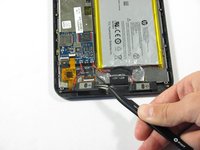
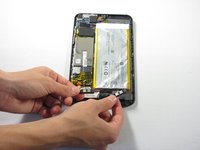
    1. HP Stream 8 Speakers Replacement, Speakers: step 5, image 1 of 2 HP Stream 8 Speakers Replacement, Speakers: step 5, image 2 of 2
      Tool used on this step:
      Tweezers
      $4.99
      Buy
      • Locate the two speakers at the bottom of the device.

      • Remove the two speakers by prying them out using a pair of tweezers.

      • Detach the red and black power wiring from the device and pull the speakers entirely out of the HP Stream 8.

      • Remember where the red and black wiring is connected to the device.

      • The power wires are soldered to the device and will be difficult to detach.

      Ask FixBot

      Add Comment

    2. HP Stream 8 Speakers Replacement: step 6, image 1 of 1
      • Grab the two replacement speakers and the soldering iron.

      • Locate where the red and black power wiring previously connected to the device.

      • Attach and re-solder the red and black power wiring.

      • For soldering help, check out iFixit's How to Solder and Desolder Connections guide.

      Ask FixBot

      Add Comment

Conclusion

To reassemble your device, follow these instructions in reverse order.

Cancel: I did not complete this guide.

One other person completed this guide.

Nick Miller

Member since: 04/11/16

669 Reputation

6 Guides authored

Team

Cal Poly, Team 34-14, Maness Spring 2016 Member of Cal Poly, Team 34-14, Maness Spring 2016

CPSU-MANESS-S16S34G14

4 Members

72 Guides authored

0 Guide Comments

Add Comment

View Statistics:

Past 24 Hours: 0

Past 7 Days: 2

Past 30 Days: 21

All Time: 663