Free Shipping on Domestic Orders $75+

HP Stream 14-CB174WM Lower Case Replacement

What you need

    1. HP Stream 14-CB174WM Lower Case Replacement, Lower Case: step 1, image 1 of 2 HP Stream 14-CB174WM Lower Case Replacement, Lower Case: step 1, image 2 of 2
      • Use an opening pick to gently pry up the edge of the rubber foot.

      • Grab the lifted edge of the foot and gently pull it away.

      • Repeat for the other rubber foot.

      • The oils on your skin can damage the adhesive on the rubber feet. Try not to touch the adhesive part of the feet with your hands.

      Ask FixBot

      Add Comment

    2. HP Stream 14-CB174WM Lower Case Replacement: step 2, image 1 of 2 HP Stream 14-CB174WM Lower Case Replacement: step 2, image 2 of 2
      • Use a Phillips screwdriver to remove the eight 6.6 mm screws that secure the lower case.

      Ask FixBot

      Add Comment

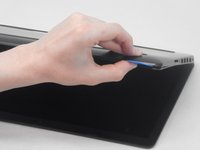
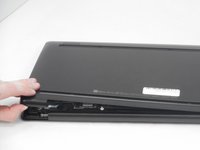
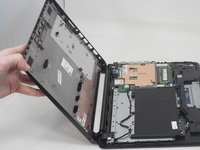
    3. HP Stream 14-CB174WM Lower Case Replacement: step 3, image 1 of 3 HP Stream 14-CB174WM Lower Case Replacement: step 3, image 2 of 3 HP Stream 14-CB174WM Lower Case Replacement: step 3, image 3 of 3
      • Insert an opening pick in the seam between the lower case and chassis.

      • Slide the opening pick around the perimeter, prying every couple of centimeters as you go.

      • You will hear "snaps" of the lower case retaining clips releasing.

      • Continue prying around the entire perimeter until the lower case fully releases.

      • Lift off the lower case.

      Ask FixBot

      Add Comment

Conclusion

To reassemble your device, follow these instructions in reverse order.

Cancel: I did not complete this guide.

Connor Bassolino

Member since: 03/29/22

25,358 Reputation

125 Guides authored

Team

iFixit Member of iFixit

Staff

123 Members

76,103 Guides authored

0 Guide Comments

Add Comment

View Statistics:

Past 24 Hours: 1

Past 7 Days: 10

Past 30 Days: 28

All Time: 356