
HP Stream 13-c002dx Battery Replacement

Matthew Dodge and 6 other contributors
Last updated on Jun 14, 2021
Views: 3.9K
View statistics:
- Past 24 Hours:
- 1
- Past 7 Days:
- 19
- Past 30 Days:
- 68
- All Time:
- 3,927
Comments: 0
No one has left comments on this guide. Will you be first?
Go to guide commentsCompleted: 2 3
2 people have marked this guide "completed." Will you be next?
3 people have marked this guide "completed." Including you — great job!
Favorites: 2 3
2 people have favorited (and subscribed to) this guide. Will you be next?
3 people have favorited (and subscribed to) this guide — including you!
Introduction
Go to step 1 ↓Use this guide to replace the battery in your HP Stream 13-c002dx. You may need to replace the battery in your HP Stream if it is having overheating issues or is unable to hold a charge. The tools required are listed below, but before beginning make sure the device is completely powered off and disconnected from any external power sources.
What you need
Fix Kit
This kit contains all the parts and tools needed to complete this guide.

Parts

Tools
-
-
-
Spudger4.9


-
-
-
Flip the laptop over so the bottom is facing up.
-
Use your Phillips #0 screwdriver to remove the eleven visible 5 mm screws on the back of the laptop.
-
Unscrew the two remaining 2.5mm screws. Keep these screws separate from the first eleven 5mm screws.
 Ask FixBot
-
-
-
Using a spudger, separate the keyboard surface from the bottom of the laptop.
-
While lifting the keyboard surface from the bottom, you will notice three cables still attaching them together. Gently unplug each of these cables from the motherboard.
-
Remove the keyboard assembly.
-
-
-
-
-
-
Use the Phillips #0 to remove four screws from the top of the battery labeled A.
-
Use the Phillips #0 screwdriver to remove four screws labeled holding the battery to the case.
-
-
-
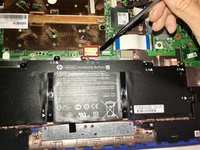
Coming from the upper middle of the battery, there are cables which connect the battery to the motherboard. Gently remove this group of cables from the socket that it is in on the motherboard.
-
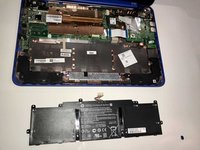
Lift the battery out.
-
-


To reassemble your device, follow these instructions in reverse order.
Cancel: I did not complete this guide.
2 other people completed this guide.

Team

Western Carolina University, Team S1-G1, Virtue Spring 2018 Member of Western Carolina University, Team S1-G1, Virtue Spring 2018
WCU-VIRTUE-S18S1G1
4 Members
60 Guides authored
