Introduction
Do you need to replace your HP Stream 11-y010nr keyboard? Or do you need to access internal components only accessible through the keyboard? This guide will take you through the necessary steps to take off and replace the keyboard. Use caution when taking the keyboard off however, as this could be sharp (or have sharp components underneath the keyboard). Additionally, ribbons (thin wires) are attached to the keyboard, so use caution when taking it off.
Prior to beginning, ensure the laptop is completely powered off such that it will not interfere with the steps in this guide.
What you need
-
-
Tool used on this step:Tweezers$4.99
-
Gently peel back the two rubber strips that cover the screws on backside of the computer with the needle nose tweezers.
 Ask FixBot
-
-
-
Unscrew the seven 0.4mm screws on the backside of the laptop with the Phillips #0 Screwdriver.
-
-
-
-
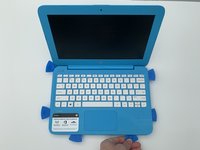
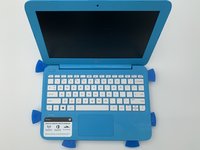
Take the opening picks and push them into the seam between the keyboard and the laptop casing.
-
Go all the way around the laptop.
-
-
-
Once the cover is loose enough, lift the keyboard up to expose the wiring beneath.
-
-
-
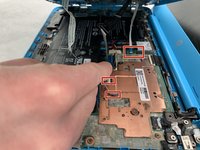
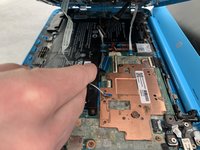
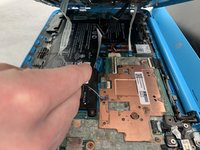
Disconnect the three cables by lifting up on the locking tab of the ZIF connector and pulling the cables out with the needle nose tweezers.
-
Remove the keyboard.
-
-




To reassemble your device, follow these instructions.
Cancel: I did not complete this guide.
One other person completed this guide.

Team

Embry-Riddle Aeronautical University, Team S5-G6, Watkins Spring 2020 Member of Embry-Riddle Aeronautical University, Team S5-G6, Watkins Spring 2020
ERAU-WATKINS-S20S5G6
4 Members
72 Guides authored
