Free Shipping on Domestic Orders $75+

HP Slate 8 Pro IO Board Replacement

What you need

    1. HP Slate 8 Pro IO Board Replacement, Remove back cover: step 1, image 1 of 1
      • Turn off the tablet. If you are unsure whether the tablet is off or in Hibernation, turn the tablet on, and then shut it down

      • Remove the back cover.

      Ask FixBot

      Add Comment

    2. HP Slate 8 Pro IO Board Replacement, Disconnect battery cable: step 2, image 1 of 1
      • Disconnect the battery cable from the system board

      Ask FixBot

      Add Comment

    3. HP Slate 8 Pro IO Board Replacement, Remove ribbon cables: step 3, image 1 of 1
      • Pull the yellow ribbons

      Ask FixBot

      Add Comment

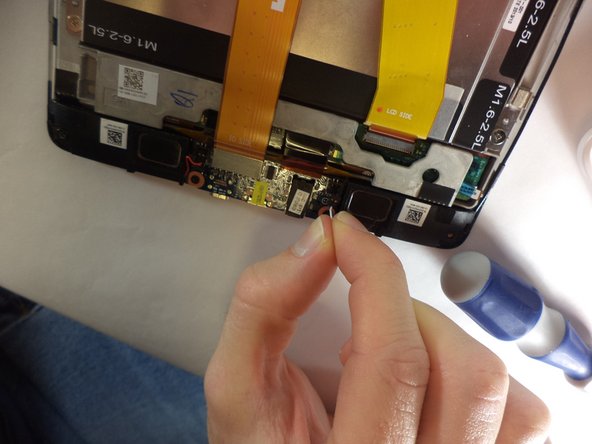
    4. HP Slate 8 Pro IO Board Replacement, Disconnect speaker cables: step 4, image 1 of 1
      • Disconnect the speaker cables from the I/O board

      Ask FixBot

      Add Comment

    5. HP Slate 8 Pro IO Board Replacement, Remove screws: step 5, image 1 of 1
      • Remove the two Phillips PM1.5×4.0 screws that secure the I/O board to the display panel assembly.

      Ask FixBot

      Add Comment

    6. HP Slate 8 Pro IO Board Replacement, Remove the IO board: step 6, image 1 of 1
      • Remove the IO board carefully.

      Ask FixBot

      Add Comment

Conclusion

To reassemble your device, follow these instructions in reverse order.

Cancel: I did not complete this guide.

One other person completed this guide.

Claudia

Member since: 08/31/14

258 Reputation

2 Guides authored

Team

USF Tampa, Team 9-4, Blackwell Fall 2014 Member of USF Tampa, Team 9-4, Blackwell Fall 2014

USFT-BLACKWELL-F14S9G4

4 Members

60 Guides authored

0 Guide Comments

Add Comment

View Statistics:

Past 24 Hours: 1

Past 7 Days: 4

Past 30 Days: 15

All Time: 1,085