
HP ProOne 600 G1 RAM Replacement

Claire Crocker and 5 other contributors
Last updated on Dec 21, 2015
Views: 3.2K
View statistics:
- Past 24 Hours:
- 7
- Past 7 Days:
- 33
- Past 30 Days:
- 133
- All Time:
- 3,250
Comments: 0
No one has left comments on this guide. Will you be first?
Go to guide commentsCompleted: 4 5
4 people have marked this guide "completed." Will you be next?
5 people have marked this guide "completed." Including you — great job!
Favorites: 0 1
No one has favorited (and subscribed to) this guide. Will you be the first?
1 person has favorited (and subscribed to) this guide — and that's you!
Introduction
Go to step 1 ↓The RAM may be replaced or updated in order to increase your computer's speed and performance. Before performing any work, always remember to completely turn off and disconnect your computer from any power source.
-
-
-
Push the unlock tabs on the back on the monitor in and towards each other while sliding the back cover up.
 Ask FixBot
-
-
-
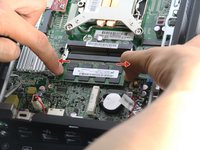
Locate the RAM in the bottom right hand corner.
-
Pull the two silver brackets holding the RAM away from each other.
-
-
-



To reassemble your device, follow these instructions in reverse order.
Cancel: I did not complete this guide.
4 other people completed this guide.

Team

Cal Poly, Team 1-20, Maness Fall 2015 Member of Cal Poly, Team 1-20, Maness Fall 2015
CPSU-MANESS-F15S1G20
4 Members
72 Guides authored
