Free Shipping on Domestic Orders $75+

HP ProOne 600 G1 Fan Replacement

What you need

  1. HP ProOne 600 G1 Fan Replacement, Back Removal: step 1, image 1 of 2 HP ProOne 600 G1 Fan Replacement, Back Removal: step 1, image 2 of 2
    • Push the unlock tabs on the back of the monitor in and towards each other while sliding the back cover up.

    Ask FixBot

    Add Comment

  2. HP ProOne 600 G1 Fan Replacement: step 2, image 1 of 2 HP ProOne 600 G1 Fan Replacement: step 2, image 2 of 2
    • Loosen the two 1/2" screws , with the T15 Torx Screwdriver, on each side of the stand. Remove stand.

    Ask FixBot

    Add Comment

  3. HP ProOne 600 G1 Fan Replacement: step 3, image 1 of 1
    • Take out the single 3/8" screw, with the T15 Torx Screwdriver, from the middle of the backplate.

    Ask FixBot

    Add Comment

  4. HP ProOne 600 G1 Fan Replacement: step 4, image 1 of 1
    • Remove the backplate by pulling it back towards you.

    • Small plastic tabs hold in the backplate, pull these up to remove it.

    Ask FixBot

    Add Comment

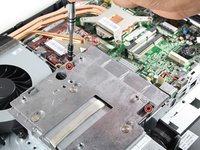
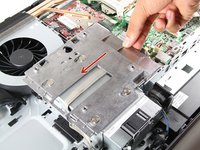
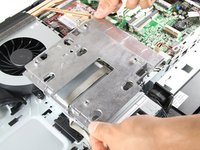
  5. HP ProOne 600 G1 Fan Replacement, Fan: step 5, image 1 of 3 HP ProOne 600 G1 Fan Replacement, Fan: step 5, image 2 of 3 HP ProOne 600 G1 Fan Replacement, Fan: step 5, image 3 of 3
    • Remove both 3/8" screws using the T15 Torx Screwdriver from the metal plate, and slide the plate to the left.

    Ask FixBot

    Add Comment

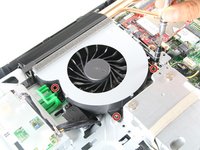
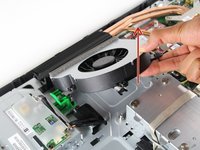
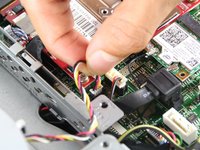
  6. HP ProOne 600 G1 Fan Replacement: step 6, image 1 of 3 HP ProOne 600 G1 Fan Replacement: step 6, image 2 of 3 HP ProOne 600 G1 Fan Replacement: step 6, image 3 of 3
    • Unscrew three surrounding 1/4" screws, with the T15 Torx Screwdriver. Pull out the fan and attached wires.

    Ask FixBot

    Add Comment

Conclusion

To reassemble your device, follow these instructions in reverse order.

Cancel: I did not complete this guide.

Victor Chacon

Member since: 10/01/15

116 Reputation

1 Guide authored

Team

Cal Poly, Team 1-20, Maness Fall 2015 Member of Cal Poly, Team 1-20, Maness Fall 2015

CPSU-MANESS-F15S1G20

4 Members

12 Guides authored

0 Guide Comments

Add Comment

View Statistics:

Past 24 Hours: 2

Past 7 Days: 8

Past 30 Days: 56

All Time: 2,615