
HP ProBook 650 G1 Thermal Paste Replacement

Simeon Brankov and one other contributor
Last updated on Jul 10, 2026
Views: 341
View statistics:
- Past 24 Hours:
- 4
- Past 7 Days:
- 30
- Past 30 Days:
- 115
- All Time:
- 341
Comments: 0
No one has left comments on this guide. Will you be first?
Go to guide commentsCompleted: 1 2
1 person has marked this guide "completed." Will you be next?
2 people have marked this guide "completed." Including you — great job!
Favorites: 0 1
No one has favorited (and subscribed to) this guide. Will you be the first?
1 person has favorited (and subscribed to) this guide — and that's you!
Community-Contributed Guide
An awesome member of our community made this guide. It was not created by iFixit staff.
Introduction
Go to step 1 ↓This guide will show you how to open the laptop to replace the Thermal Paste. This guide will also help you upgrade the RAM, SSD and CPU inside.
What you need
Parts

Tools


-
-
-
Unlock and remove the back panel and battery.
-
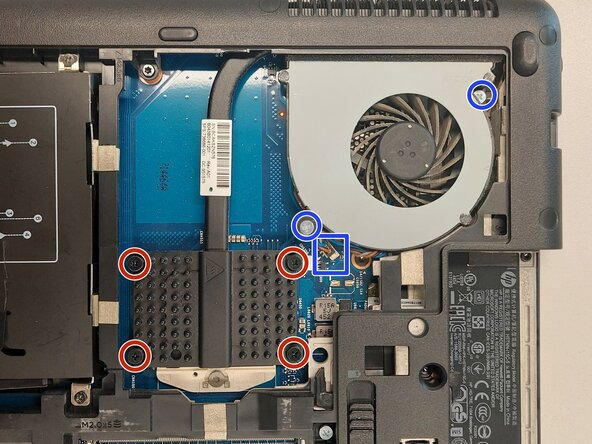
Disconnect, unscrew and remove the fan.
-
Unscrew the 4 screws holding the CPU heatsink.
 Ask FixBot
-
-
-
-
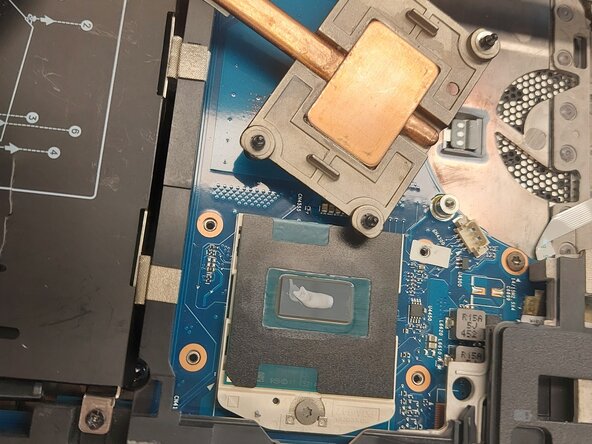
Clean the old thermal paste from both the cooler and the CPU.
-
It's also recommended to use compressed air to remove any dust in the laptop and the fan.
-
Here you can upgrade the CPU if needed.
-
Use only enough thermal paste to cover a portion of the pad. Use a spreader if you have one.
-
Place the heatsink back into the unit carefully and tighten the screws in an "X" pattern to ensure even pressure. Don't forget to plug in the fan.
-
-
-
Once you have the back cover opened, it is a good opportunity to upgrade the SSD and RAM.
-
-






To reassemble your device, follow these instructions in reverse order.
Cancel: I did not complete this guide.
One other person completed this guide.

