
HP ProBook 640 G4 Speaker Replacement

Adnan Shinwari and 2 other contributors
Last updated on Jun 3, 2026
Views: 215
View statistics:
- Past 24 Hours:
- 1
- Past 7 Days:
- 17
- Past 30 Days:
- 66
- All Time:
- 215
Comments: 0
No one has left comments on this guide. Will you be first?
Go to guide commentsCompleted: 0 1
No one has marked this guide "completed." Will you be the first?
1 person has marked this guide "completed." It's you — great job!
Favorites: 0 1
No one has favorited (and subscribed to) this guide. Will you be the first?
1 person has favorited (and subscribed to) this guide — and that's you!
Missing Steps
Oops! This guide is currently missing one or more important steps.
Introduction
Go to step 1 ↓Use this guide to replace a damaged or faulty speaker in your HP ProBook 640 G4 laptop.
The speaker is responsible for producing sound from your device. If you are experiencing issues such as no audio, distorted sound, low volume, or crackling noises, the speaker may need to be replaced.
Before starting, check your system volume settings and test your audio with headphones or external speakers to make sure the issue isn’t related to software or audio drivers.
Make sure to power off your laptop and disconnect it from any power source before beginning the repair.
What you need
Tools


-
-
-
Loosen the eight 2.5 mm-long Phillips captive screws securing the lower case.
 Ask FixBot
-
-
-
Insert an opening pick into the seam between the lower case and chassis, and twist it to create a gap.
-
Insert an opening tool into the gap.
-
Use the opening tool to pry around the entire perimeter of the device until the lower case fully releases.
-
Remove the lower case.
-
-
-
-
-
Use a Phillips screwdriver to loosen the six 2.5 mm-long captive screws securing the battery.
-
Slide and lift the battery out.
-
-
-
-
-
Loosen the four captive 2.5 mm-long Phillips screws securing the SSD.
-
Grip the SSD and slide it out while lifting up.
-
-
-
-
-
Two clips secure each RAM module in place, one on each side. Using your fingers, spread the clips away from the RAM module.
-
Repeat for the other RAM module.
-
Remove each of the two RAM modules.
-
-
-
-
-
Remove 5 2.5 mm Phillips head screws.
-
Remove 12 6 mm Torx head screws.
-
Remove 2 2.5 mm Phillips head screws.
-
Loosen 4 2.5 mm Phillips head screws.
-
Loosen 4 2.5 mm Phillips head screws.
-
-
-
-
-
Loosen the four 2.5 mm-long Phillips screws securing the heat sink.
-
Loosen the four 2.5 mm-long Phillips screws securing the fan.
-
-
-
-
-
-
Remove the 2 mm-long Phillips screw.
-
Remove the 2.5 mm-long Phillips screw.
-
-
-
Disconnect the ZIF connector by gently lifting the hinged locking flap on the connector's top edge until it's vertical, then carefully slide the ZIF connector straight out.
-
Lift the motherboard at an angle making sure to slide the ports out the casing.
-
-
-
-
-
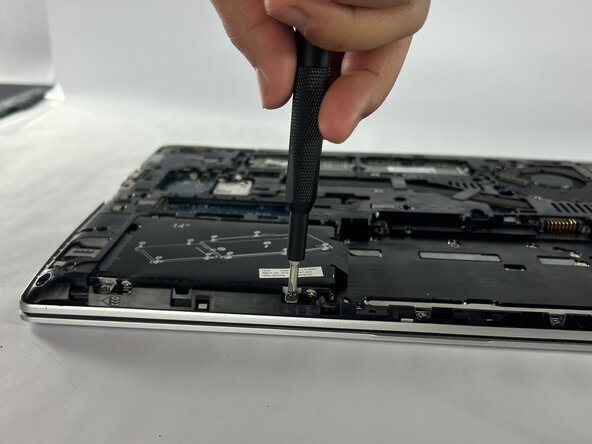
Loosen the one screw 3.4mm with a Phillips #000 screwdriver.
-
Take the speaker out.
-
-




To reassemble your device, follow these instructions in reverse order.

Team

Austin Community College, Team 1-3, Caverte Spring 2026 Member of Austin Community College, Team 1-3, Caverte Spring 2026
AUSTINCC-CAVERTE-S26S1G3
3 Members
36 Guides authored
