Free Shipping on Domestic Orders $75+

HP ProBook 430 G6 Basic Disassembly

What you need

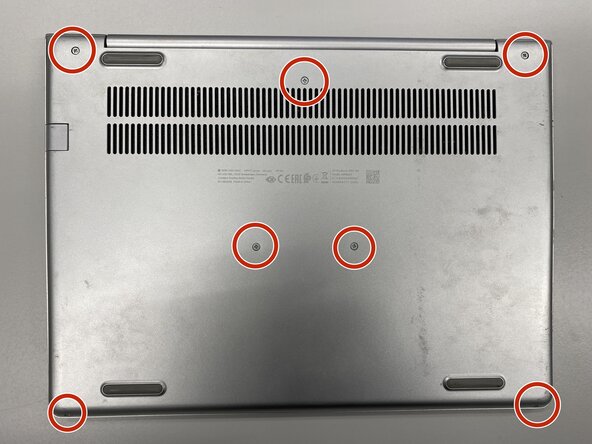
  1. HP ProBook 430 G6 Basic Disassembly, Remove the screws from the base: step 1, image 1 of 1
    • Turn off the laptop and remove power cable.

    • Flip the laptop upside down.

    • Remove the labeled screws with Phillips #0 screwdriver.

    Ask FixBot

    Add Comment

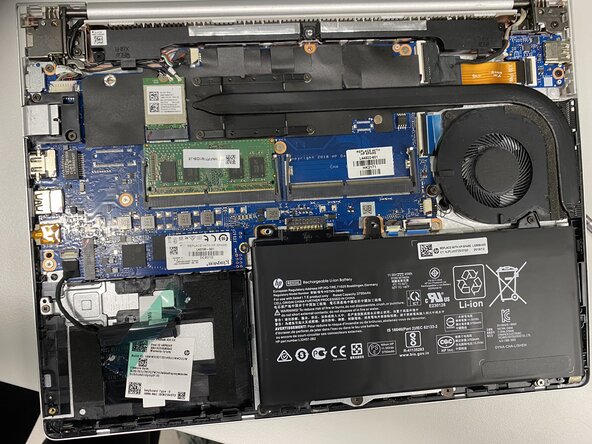
  2. HP ProBook 430 G6 Basic Disassembly, Remove the base: step 2, image 1 of 1
    • Remove the metal base with iFixit Opening Tool or Opening Picks.

    Ask FixBot

    Add Comment

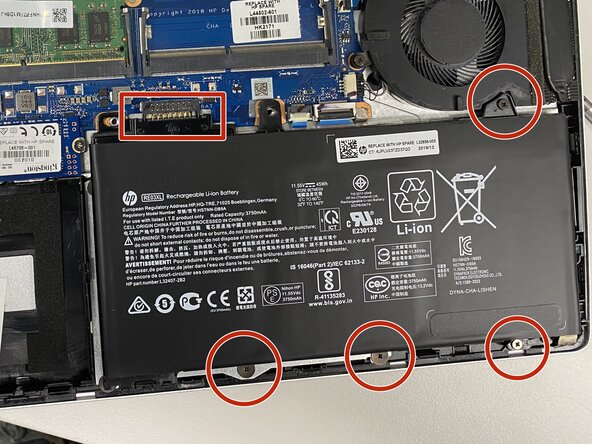
  3. HP ProBook 430 G6 Basic Disassembly, Disconnect the battery: step 3, image 1 of 1
    • Disconnect the battery by removing the labeled screws and lifting the battery upwards from the box-labeled connector.

    • Battery disconnecting is very important to do before any replacements!

    Ask FixBot

    Add Comment

Conclusion

To do some cleaning or replacement operation, you need to disassembly your laptop with this guide.

Cancel: I did not complete this guide.

Hiiri522

Member since: 08/10/25

593 Reputation

6 Guides authored

0 Guide Comments

Add Comment

View Statistics:

Past 24 Hours: 0

Past 7 Days: 11

Past 30 Days: 28

All Time: 325