Free Shipping on Domestic Orders $75+

HP Photosmart 935 Batteries Replacement

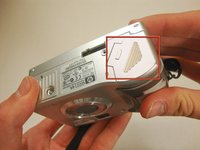
  1. HP Photosmart 935 Batteries Replacement, Batteries: step 1, image 1 of 2 HP Photosmart 935 Batteries Replacement, Batteries: step 1, image 2 of 2
    • Flip the camera over so the bottom of the camera is facing you.

    Ask FixBot
    • Turn the mode dial to the OFF position.

    Ask FixBot
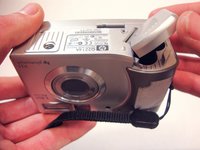
  2. HP Photosmart 935 Batteries Replacement: step 3, image 1 of 2 HP Photosmart 935 Batteries Replacement: step 3, image 2 of 2
    • Slide the bottom cover in the direction of the arrow to open it.

    Ask FixBot
  3. HP Photosmart 935 Batteries Replacement: step 4, image 1 of 1
    • Pull out the batteries.

    Ask FixBot
Conclusion

To reassemble your device, follow these instructions in reverse order.

12 other people completed this guide.

Clay Young

Member since: 04/04/12

245 Reputation

2 Guides authored

Team

Cal Poly, Team 15-13, Forte Spring 2012 Member of Cal Poly, Team 15-13, Forte Spring 2012

CPSU-FORTE-S12S15G13

5 Members

10 Guides authored

0 Guide Comments

Add Comment

View Statistics:

Past 24 Hours: 1

Past 7 Days: 13

Past 30 Days: 76

All Time: 1,982