Introduction
Use this guide to replace the RAM in an HP Pavilion x360 15t-br000.
Signs of a dysfunctional RAM stick can be the slowing of your operating system as well as crashes during computer startup. By replacing the RAM, the operating system’s efficiency can be dramatically increased and these problems can be resolved.
Remember to shut down the computer before beginning the replacement.
What you need
-
-
-
Remove the covers to access the screws attached to the back cover of the device.
-
Remove six 3mm screws using the Phillips #0 screwdriver.
 Ask FixBot
-
-
-
Use a metal spudger to loosen the four corners of the keyboard panel. The corner is circled red as shown in the first image.
-
Disconnect the keyboard panel cables under the upper case.
-
Remove the keyboard panel from the device.
-
-
-
-
-
-
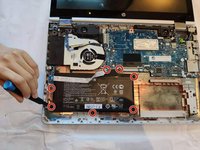
Remove the seven Phillips #0 4.5 mm screws.
-
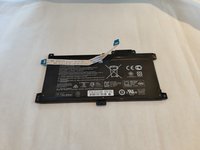
Remove the battery from the device.
-
-
-
-
Unscrew the nine 3mm mounting screws on the motherboard using the Phillips #0 screwdriver.
-
-




To reassemble your device, follow these instructions in reverse order.

Team

The Citadel Military College of South Carolina, Team 3-22, Eggleston Fall 2021 Member of The Citadel Military College of South Carolina, Team 3-22, Eggleston Fall 2021
CMCSC-EGGLESTON-F21S3G22
2 Members
36 Guides authored
