Free Shipping on Domestic Orders $75+

HP Pavilion g7-2275dx Wireless Card Replacement

What you need

    1. HP Pavilion g7-2275dx Wireless Card Replacement, Battery: step 1, image 1 of 1
      • Working on your device while it is turned on may result in electric shock. Make sure to shut down and unplug your device before you begin.

      • Flip your device over so the bottom panel is facing up.

      Ask FixBot

      Add Comment

    2. HP Pavilion g7-2275dx Wireless Card Replacement: step 2, image 1 of 1
      • The battery is held in by a latch in the front and tabs in the back.

      • Slide the lock switch left, towards the center of the computer.

      • Lift up the battery, rotating it up and away from you, then pull it out.

      • To put the battery back in, line it up with the battery bay and the holes for the tabs. Then let the battery rotate towards you and press down until the latch engages and you hear a click.

      Ask FixBot

      Add Comment

    1. HP Pavilion g7-2275dx Wireless Card Replacement, Disassembling HP Pavilion g7-2275dx Back Panel: step 3, image 1 of 1
      • Unscrew one Phillips #1 screw from the back panel.

      • The screw is on a spring and attached to the panel. It will pop up, but will not separate from the back panel.

      Ask FixBot

      Add Comment

    2. HP Pavilion g7-2275dx Wireless Card Replacement: step 4, image 1 of 2 HP Pavilion g7-2275dx Wireless Card Replacement: step 4, image 2 of 2
      • Slide the back panel down and pull it up.

      Ask FixBot

      Add Comment

    1. HP Pavilion g7-2275dx Wireless Card Replacement, Wireless Card: step 5, image 1 of 1
      • Use a Phillips #1 screw driver to unscrew the black 4 mm Phillips #1 screw on the wireless card.

      Ask FixBot

      Add Comment

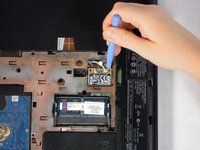
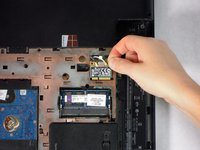
    2. HP Pavilion g7-2275dx Wireless Card Replacement: step 6, image 1 of 2 HP Pavilion g7-2275dx Wireless Card Replacement: step 6, image 2 of 2
      • Use a plastic opening tool to lift the wireless card out of its slot.

      Ask FixBot

      Add Comment

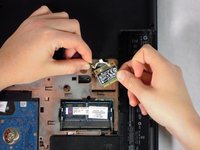
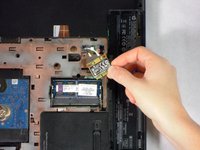
    3. HP Pavilion g7-2275dx Wireless Card Replacement: step 7, image 1 of 2 HP Pavilion g7-2275dx Wireless Card Replacement: step 7, image 2 of 2
      • Pull the black and white wires up and off of the wireless card.

      • Remove the wireless card.

      Ask FixBot

      Add Comment

Conclusion

To reassemble your device, follow these instructions in reverse order.

Cancel: I did not complete this guide.

2 other people completed this guide.

John Sutton

Member since: 04/24/14

1,588 Reputation

8 Guides authored

Team

Cal Poly, Team 11-51, Amido Spring 2014 Member of Cal Poly, Team 11-51, Amido Spring 2014

CPSU-AMIDO-S14S11G51

4 Members

144 Guides authored

0 Guide Comments

Add Comment

View Statistics:

Past 24 Hours: 1

Past 7 Days: 6

Past 30 Days: 40

All Time: 2,850