Free Shipping on Domestic Orders $75+

HP Pavilion g7-1150us Optical Drive Replacement

What you need

    1. HP Pavilion g7-1150us Optical Drive Replacement, Battery: step 1, image 1 of 2 HP Pavilion g7-1150us Optical Drive Replacement, Battery: step 1, image 2 of 2
      • Slide the battery removal switch towards the center of the laptop until the battery pops out.

      Ask FixBot

      Add Comment

    2. HP Pavilion g7-1150us Optical Drive Replacement: step 2, image 1 of 1
      • Remove the battery from the computer.

      Ask FixBot

      Add Comment

    1. HP Pavilion g7-1150us Optical Drive Replacement, Surface Panel: step 3, image 1 of 1
      • Unscrew the two 4mm Phillips #0 screws found in the surface panel.

      Ask FixBot

      Add Comment

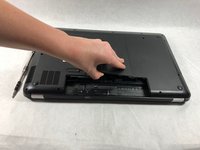
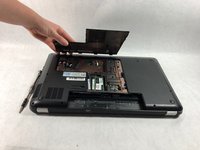
    2. HP Pavilion g7-1150us Optical Drive Replacement: step 4, image 1 of 2 HP Pavilion g7-1150us Optical Drive Replacement: step 4, image 2 of 2
      • Using the spudger, pry the surface panel off starting from the side where the battery was located.

      • Pry the remainder of the panel off by sliding the spudger underneath the panel and gently lifting.

      • Aim for the corners of the panel while using the spudger to methodically remove it without damaging it.

      Ask FixBot

      Add Comment

    3. HP Pavilion g7-1150us Optical Drive Replacement: step 5, image 1 of 1
      • Lift the pried surface panel off of the computer.

      Ask FixBot

      Add Comment

    1. HP Pavilion g7-1150us Optical Drive Replacement, Optical Drive: step 6, image 1 of 1
      • Use the screwdriver to remove the 4mm Phillips #0 screw holding the optical drive in.

      Ask FixBot

      Add Comment

    2. HP Pavilion g7-1150us Optical Drive Replacement: step 7, image 1 of 1
      • Use your fingers to grab the optical drive.

      Ask FixBot

      Add Comment

    3. HP Pavilion g7-1150us Optical Drive Replacement: step 8, image 1 of 1
      • Pull out drive completely.

      Ask FixBot

      Add Comment

Conclusion

To reassemble your device, follow these instructions in reverse order.

Cancel: I did not complete this guide.

Cierra Sheerin

Member since: 03/25/19

97 Reputation

1 Guide authored

Team

2 Guide Comments

What do you do when the DVD drive will NOT slide out? That’s my problem. There’s no disk inside; the unit is simply stuck shut. Now what do you do?

paulwrites - Reply Share

For me, the DVD drive connection had, what I think was soda, inside of the port and it acted like a sort of glue so brute force may be the option.

After a deep cleaning of the connections, it worked like new.

Dylan Dopp - Reply Share

Add Comment

View Statistics:

Past 24 Hours: 0

Past 7 Days: 6

Past 30 Days: 26

All Time: 759