Introduction
This is a step-by-step guide for replacing the Random Access Memory (RAM) in an HP pavilion dv7-6178us laptop. The guide will show you where to look for the RAM and how to pull the RAM out. RAM replacement is a good idea because it speeds up the overall laptop performance. If you noticed your laptop performance is slowing down or your computer is freezing, then it is a sign that your laptop may need a RAM replacement or upgrade. As you install more programs, the laptop performance deteriorates. If you plan to do any video editing or play video games on it, then a RAM upgrade could enhance the performance of your computer for processing intensive applications.
-
-
-
Flip over the laptop and push the sliding lock to the right (or whichever side indicates it with a symbol.)
-
After that is done, carefully pull off the back piece. It should look similar to the second photo.
 Ask FixBot
-
-
-
-
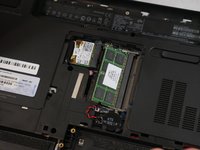
Once the tabs on the sides are released the RAM card will pop out by itself to this angle, as shown in the picture.
-
-
-
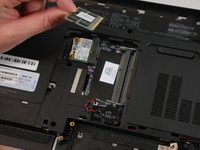
Pull the card out of the socket and you have successfully removed one RAM card.
-
-
-
Steps 2 through 4 can also be done on the second RAM card, located directly below the initial RAM card.
-
-


To reassemble your device, follow these instructions in reverse order.

Team

UMass Dartmouth, Team S4-G8, Valliere Fall 2018 Member of UMass Dartmouth, Team S4-G8, Valliere Fall 2018
UMASSD-VALLIERE-F18S4G8
4 Members
72 Guides authored
