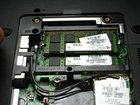
HP Pavilion dv6000 RAM Replacement

Ben Hirsch and
Last updated on Apr 19, 2021
Views: 36K
View statistics:
- Past 24 Hours:
- 4
- Past 7 Days:
- 18
- Past 30 Days:
- 107
- All Time:
- 36,156
Comments: 3
3 guide comments.
Go to guide commentsCompleted: 19 20
19 people have marked this guide "completed." Will you be next?
20 people have marked this guide "completed." Including you — great job!
Favorites: 16 17
16 people have favorited (and subscribed to) this guide. Will you be next?
17 people have favorited (and subscribed to) this guide — including you!
What you need


Introduction
Go to step 1 ↓If you need more memory because your computer is running slowly, or you are having memory problems, the RAM is very easy to replace in the HP Pavilion dv6000.
-
-
-
Remove the two screws from the memory shield and lift up. The screws will remain into the shield
 Ask FixBot
-
-
-
Using a plastic spudger depress the pins holding the RAM in. If you have an anti-static work surface or wristband, you may suppress the pins with your thumbs.
-
Pull the RAM straight out.
-
-
-
-
Under the first RAM stick is another. Remove it in the same way by pushing the silver tabs away and down from the RAM stick and remove the RAM once it pops up.
-
-
-
You have removed your RAM!
-
If you want to expand your RAM you will have to use DDR2 PC2-5300 SODIMM laptop memory modules, they are clocked at 667MHz
-
To reinstall your RAM, follow this guide in the reverse order
-
-


To reassemble your device, follow these instructions in reverse order.
Cancel: I did not complete this guide.
19 other people completed this guide.

Team

Cal Poly, Team 21-33, Regan Fall 2010 Member of Cal Poly, Team 21-33, Regan Fall 2010
CPSU-REGAN-F10S21G33
4 Members
120 Guides authored
3 Guide Comments
if you have bios version f.25 or newer you can have up to 4gb of ram
