Free Shipping on Domestic Orders $75+

HP Pavilion dv4000 CD/DVD drive Replacement

What you need

    1. HP Pavilion dv4000 CD/DVD drive Replacement, Battery: step 1, image 1 of 1
      • Turn the laptop upside down with the battery compartment facing you.

      Ask FixBot

      Add Comment

    2. HP Pavilion dv4000 CD/DVD drive Replacement: step 2, image 1 of 1
      • Slide the battery release latch to the right and hold in place.

      Ask FixBot

      Add Comment

    3. HP Pavilion dv4000 CD/DVD drive Replacement: step 3, image 1 of 1
      • Lift the front edge of the battery up and remove it from the compartment.

      Ask FixBot

      Add Comment

    1. HP Pavilion dv4000 CD/DVD drive Replacement, Hard Drive: step 4, image 1 of 1
      • Orient the laptop with the hard drive panel towards you.

      Ask FixBot

      Add Comment

    2. HP Pavilion dv4000 CD/DVD drive Replacement: step 5, image 1 of 1
      • Unscrew the two 2x5mm screws with a #00 Phillips screwdriver.

      Ask FixBot

      Add Comment

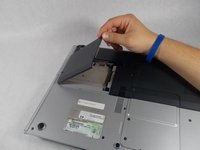
    3. HP Pavilion dv4000 CD/DVD drive Replacement: step 6, image 1 of 2 HP Pavilion dv4000 CD/DVD drive Replacement: step 6, image 2 of 2
      • Lift the cover up by the tab near the screws.

      • The cover can be removed from the laptop.

      Ask FixBot

      Add Comment

    4. HP Pavilion dv4000 CD/DVD drive Replacement: step 7, image 1 of 1
      • Grab the hard drive from the sides and slide it away from the connectors.

      • The hard drive should disconnect with light force. If it doesn't easily slide out, ensure there are no cables or obstacles preventing it from moving.

      • Lift and remove the hard drive from the laptop.

      • We did not have a hard drive in our laptop to demonstrate how to remove it.

      Ask FixBot

      Add Comment

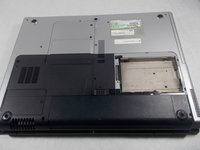
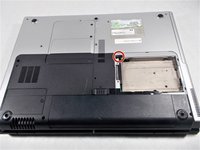
    1. HP Pavilion dv4000 CD/DVD drive Replacement, CD/DVD Drive: step 8, image 1 of 2 HP Pavilion dv4000 CD/DVD drive Replacement, CD/DVD Drive: step 8, image 2 of 2
      • Locate the one 2x5 mm screw in the hard drive bay.

      • Unscrew the screw with a #00 Phillips screwdriver.

      Ask FixBot

      Add Comment

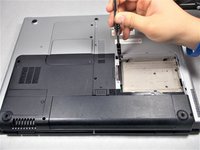
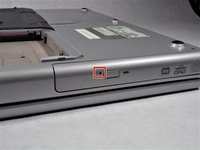
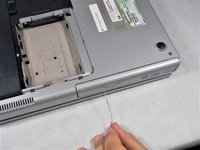
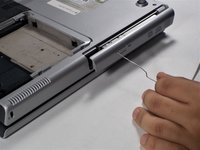
    2. HP Pavilion dv4000 CD/DVD drive Replacement: step 9, image 1 of 3 HP Pavilion dv4000 CD/DVD drive Replacement: step 9, image 2 of 3 HP Pavilion dv4000 CD/DVD drive Replacement: step 9, image 3 of 3
      • Locate the hole next to the DVD drive release button.

      • Insert a paperclip into the hole to release the DVD drive.

      Ask FixBot

      Add Comment

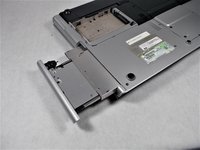
    3. HP Pavilion dv4000 CD/DVD drive Replacement: step 10, image 1 of 2 HP Pavilion dv4000 CD/DVD drive Replacement: step 10, image 2 of 2
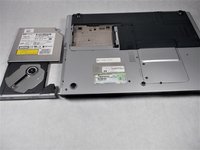
      • Carefully grasp the DVD drive and slide it out.

      Ask FixBot

      Add Comment

Conclusion

To reassemble your device, follow these instructions in reverse order.

Cancel: I did not complete this guide.

4 other people completed this guide.

Nick LaMarche

Member since: 10/18/16

373 Reputation

2 Guides authored

Team

UMass Dartmouth, Team 4-2, Catania Fall 2016 Member of UMass Dartmouth, Team 4-2, Catania Fall 2016

UMASSD-CATANIA-F16S4G2

3 Members

72 Guides authored

0 Guide Comments

Add Comment

View Statistics:

Past 24 Hours: 0

Past 7 Days: 4

Past 30 Days: 30

All Time: 1,538