Free Shipping on Domestic Orders $75+

HP Pavilion dv4-4141us RAM Replacement

What you need

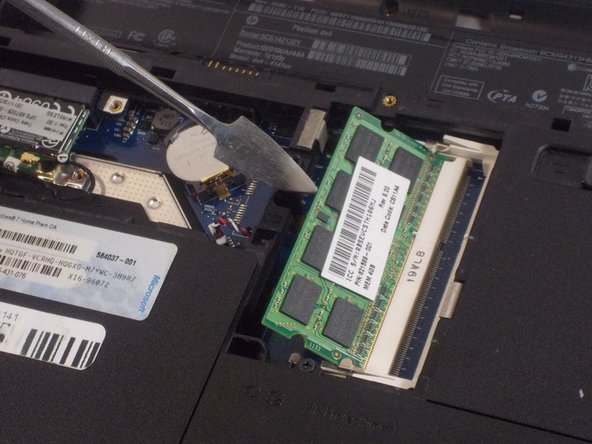
  1. HP Pavilion dv4-4141us RAM Replacement, RAM: step 1, image 1 of 1
    • Lift up the back panel using a spudger and remove it from the device.

    Ask FixBot

    Add Comment

  2. HP Pavilion dv4-4141us RAM Replacement: step 2, image 1 of 1
    • Push the two metal clips away from each other to release the RAM.

    Ask FixBot

    Add Comment

  3. HP Pavilion dv4-4141us RAM Replacement: step 3, image 1 of 2 HP Pavilion dv4-4141us RAM Replacement: step 3, image 2 of 2
    • Each RAM stick will pop up at a 45 degree angle.

    • Pull the RAM up and away and remove it from the device.

    • Do not use a metal spudger for this step. Incorrect use of the metal spudger can damage the internal components in your device.

    Ask FixBot

    Add Comment

Conclusion

To reassemble your device, follow these instructions in reverse order.

Cancel: I did not complete this guide.

Vincent Gardner

Member since: 10/25/21

390 Reputation

3 Guides authored

Team

0 Guide Comments

Add Comment

View Statistics:

Past 24 Hours: 1

Past 7 Days: 12

Past 30 Days: 31

All Time: 277